It's easy to think that Amazon ad automation will optimize itself once turned on. However, when you open actual accounts, you often see periods where spending has more than doubled, but sales haven't increased by the same amount. This article covers, step by step, how to directly check that difference on screen.
1. Summary of the Last 14 Days
We compared the last 14 days (October 21st - November 3rd) with the immediately preceding identical period, based on campaigns participating in automation in the US market.
Ad spend increased by 116.24% to $558.16, and attributed sales increased by 89.82% to $716.16. Sales increased, but spend increased even faster. Weighted ACOS rose by 9.52 points to 77.94%, and conversion rate only increased by 0.32 points to 3.65%.

2. You Need to Look at Spend Growth Rate and Sales Growth Rate Together
It's difficult to tell if things have improved or worsened by only looking at ACOS. When you put the growth rates of spend and sales side by side, the structure becomes visible. If spend increased by 116% while sales increased by 90%, it means the increased advertising was used in less efficient placements than before.
It's also important that the conversion rate remained almost the same. This is a period where sales only followed the increase in impressions and clicks, not because products or prices suddenly improved. In this case, recalculating the target ACOS should be the priority.
3. Check the Gap Between Target ACOS and Actual ACOS
Automated bidding works to maintain the target ACOS. If the target is 78%, the system will achieve 78%. The key is whether that target aligns with your current margin structure. Since FBA fees and ad competition are constantly changing, a target set half a year ago might not be profitable now.
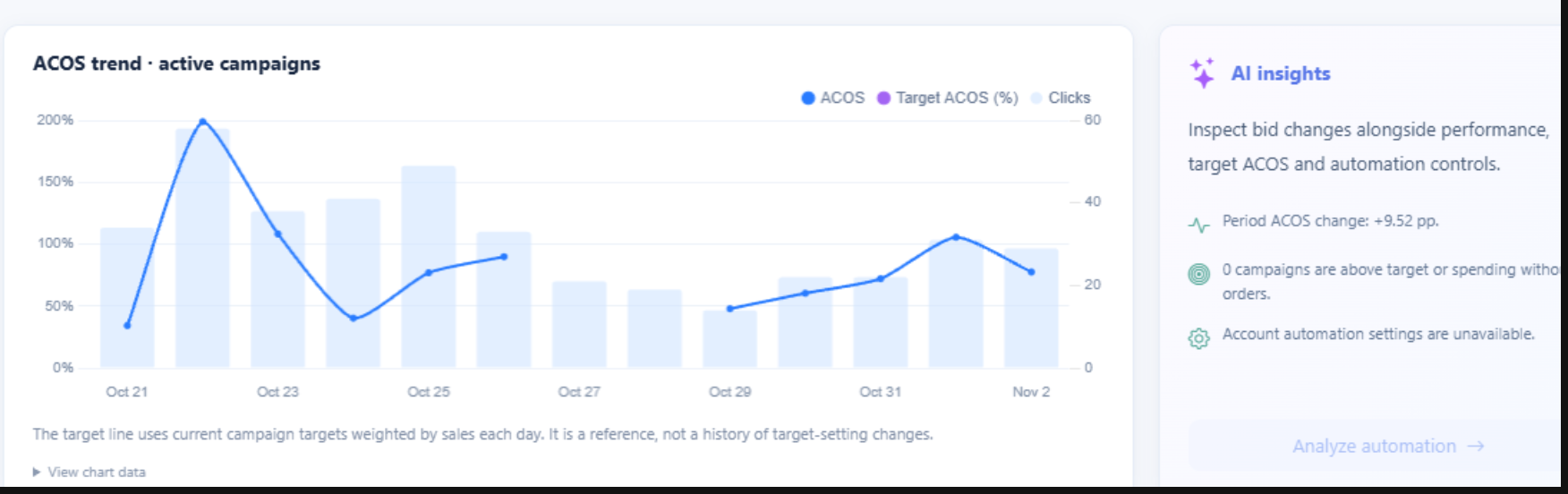
In the screen above, the dotted line represents the target ACOS, and the solid line represents the actual ACOS. The sections where the two lines diverge are the sections that require review. Below the screen, AI Insights displays the ACOS changes over the period, along with the number of campaigns that exceeded the target or spent without orders.
4. Review in 3 Steps on Screen
First, check the change rates of spend, sales, ACOS, and conversion rate in the top KPIs. Second, identify the date on the trend graph where the target line and actual line diverge. Third, check the campaign performance table to see which campaign's bids changed at that time.
SellerVisor's Auto Bid Performance Dashboard is designed to allow you to handle these three steps on a single screen. Because it only shows campaigns participating in automation, it doesn't get mixed with data from untouched campaigns.
5. 5-Minute Weekly Review Routine
We recommend a routine of spending just 5 minutes on Monday morning. ① Compare the spend growth rate and sales growth rate against the previous week. ② Find campaigns where the actual ACOS has diverged by more than 5 points from the target. ③ Recalculate and adjust the target ACOS for those campaigns based on current margins. ④ Record the adjustment date and check the results next week.
6. Points to Note When Reading the Numbers
If you set the period too short, ACOS fluctuations will appear large. Compare in at least 7-day, preferably 14-day intervals. Seasonal products or newly listed products require time for data to accumulate. Furthermore, attributed sales only aggregate orders that occurred within a certain period after an ad click, so they differ from actual total sales.
7. Frequently Asked Questions
Q. What should the target ACOS be set to?
It is generally set based on the remaining percentage after deducting non-advertising costs from the margin rate. If the margin is 30%, it is common to set the target ACOS at 30% or below.
It is generally set based on the remaining percentage after deducting non-advertising costs from the margin rate. If the margin is 30%, it is common to set the target ACOS at 30% or below.
Q. Is turning off automation the answer?
No. The priority is to reset the target to match your current margins. Automation is a tool to maintain targets, and setting targets is the seller's responsibility.
No. The priority is to reset the target to match your current margins. Automation is a tool to maintain targets, and setting targets is the seller's responsibility.
Q. How often should I check?
At least once a week; for accounts with a large proportion of ad spend, twice a week is recommended.
At least once a week; for accounts with a large proportion of ad spend, twice a week is recommended.
8. Reference
The figures in this article are based on actual account data from the last 14 days and may vary depending on the market and period. The screen shown is the SellerVisor Auto Bid Performance Dashboard.
Conclusion
Automated bidding is not a 'set and forget' feature; it's a 'manage' feature. This week, try comparing the target ACOS and actual ACOS of your automated campaigns side by side just once. Most accounts will have one or more points that need adjustment.
Request a Live Demo
SellerVisor can be started for free. By linking your ad account, you can immediately check the performance of your automated campaigns, and if needed, you can review it together during a 1:1 live demo.