 SellerVisor
Keyword Campaign Builder
Turn relevant keywords into a campaign you control
Choose the marketplace and a tracked ASIN, then run the keyword search. Narrow results with search volume, bid, category, and keyword filters.
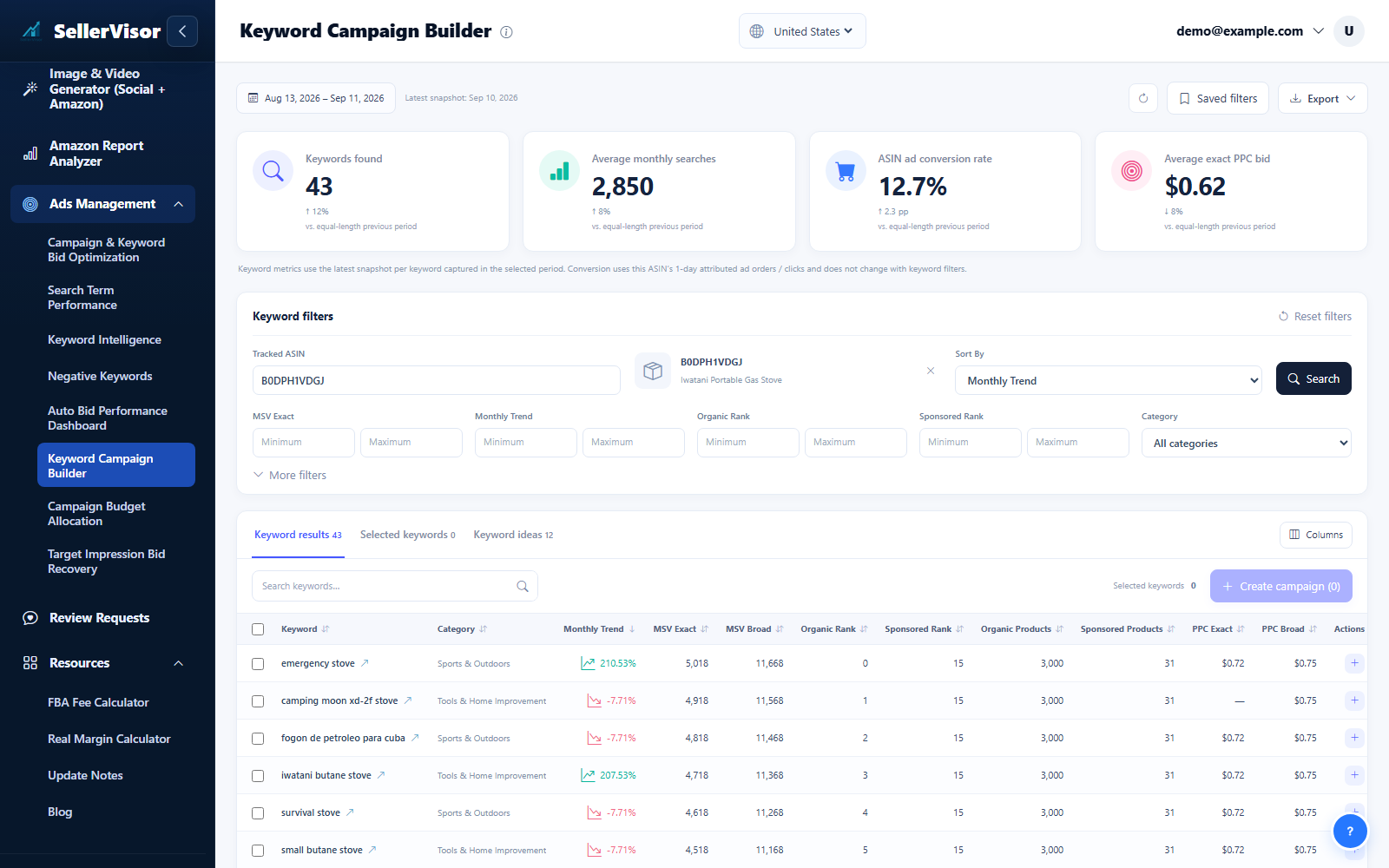
Filter by marketplace and date range before reviewing changes. Check campaign goals and the scope of each action before submitting bids, negatives, budgets, or automation settings.
1
Ads management
Keyword Campaign Builder
- Choose the marketplace and a tracked ASIN, then run the keyword search. Narrow results with search volume, bid, category, and keyword filters.
- Compare Results and Ideas, select relevant keywords across pages, and review the Selected tab. Saved filters and column choices help repeat your workflow.
- Open Create Campaign and check the advertised SKU, match type, bid, daily budget, and campaign state before submitting. Creating a campaign sends changes to Amazon Ads.
2
Ads management
Keyword Campaign Automation
- Open this automation section in Settings. Choose its marketplace scope, review the rules and selected ASINs, and check its dry-run mode before saving.
- Review related controls in the product, performance, budget, and campaign panels. Expand advanced options when needed, use the information icons for help, and save with the button that stays visible as you scroll.
Screenshots are in English and may contain sample data. Available features depend on your plan, connections, and data.