 SellerVisor
Campaign budgets
Make campaign budget decisions with context
Open Campaign Budget to review spend and budget recommendations. Filter the campaigns, inspect the proposed amounts, and confirm only the budget changes you intend to apply.
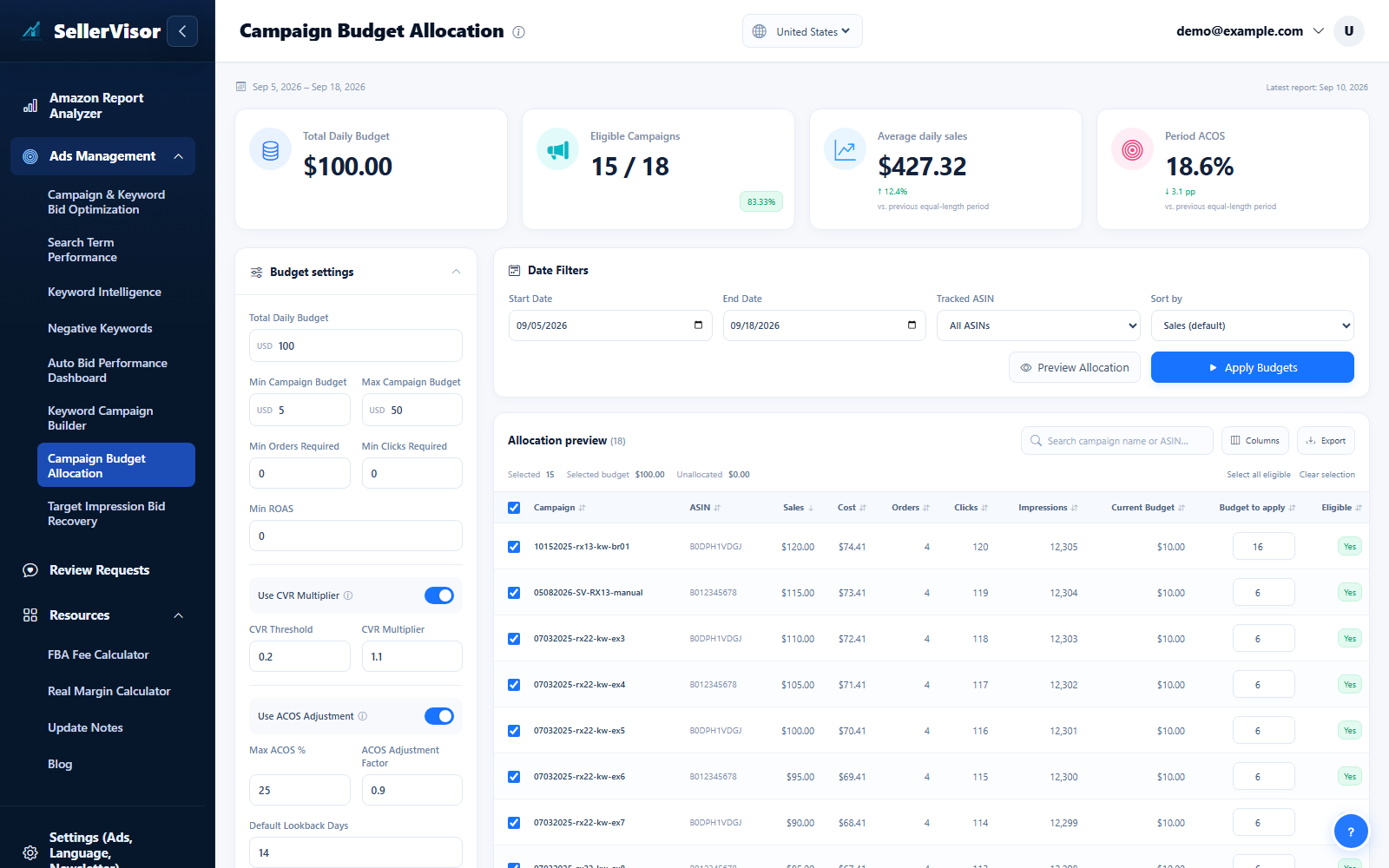
Filter by marketplace and date range before reviewing changes. Check campaign goals and the scope of each action before submitting bids, negatives, budgets, or automation settings.
1
Ads management
Campaign budgets
Open Campaign Budget to review spend and budget recommendations. Filter the campaigns, inspect the proposed amounts, and confirm only the budget changes you intend to apply.
2
Ads management
Campaign Budget Allocation Settings
- Open this automation section in Settings. Choose its marketplace scope, review the rules and selected ASINs, and check its dry-run mode before saving.
- Review related controls in the product, performance, budget, and campaign panels. Expand advanced options when needed, use the information icons for help, and save with the button that stays visible as you scroll.
3
Ads management
Advanced budget adjustments
- Enable Conversion Rate Multiplier or ACOS Adjustment to show its input pair. Turning an option off hides its inputs and retains their values for later use.
Screenshots are in English and may contain sample data. Available features depend on your plan, connections, and data.