Hello. Thank you to all customers using SellerVisor.
When ad impressions decrease, bids are usually raised first. However, if you only raise bids without knowing why impressions decreased, only costs will increase. SellerVisor's Target Impression Bid Recovery starts in reverse. It first sets a target impression and then identifies keywords that have fallen below that target.
1. What this screen does
When you set Target Impressions for each keyword, it gathers and displays active keywords that fall below that target. Each row shows previous and current impressions, previous and current bids, and recommended bids. You can select only the rows with recommendations and apply them all at once.
2. Our account screen
Values confirmed as of October 23, 2026.
- Period: 2026-10-09 ~ 2026-10-22
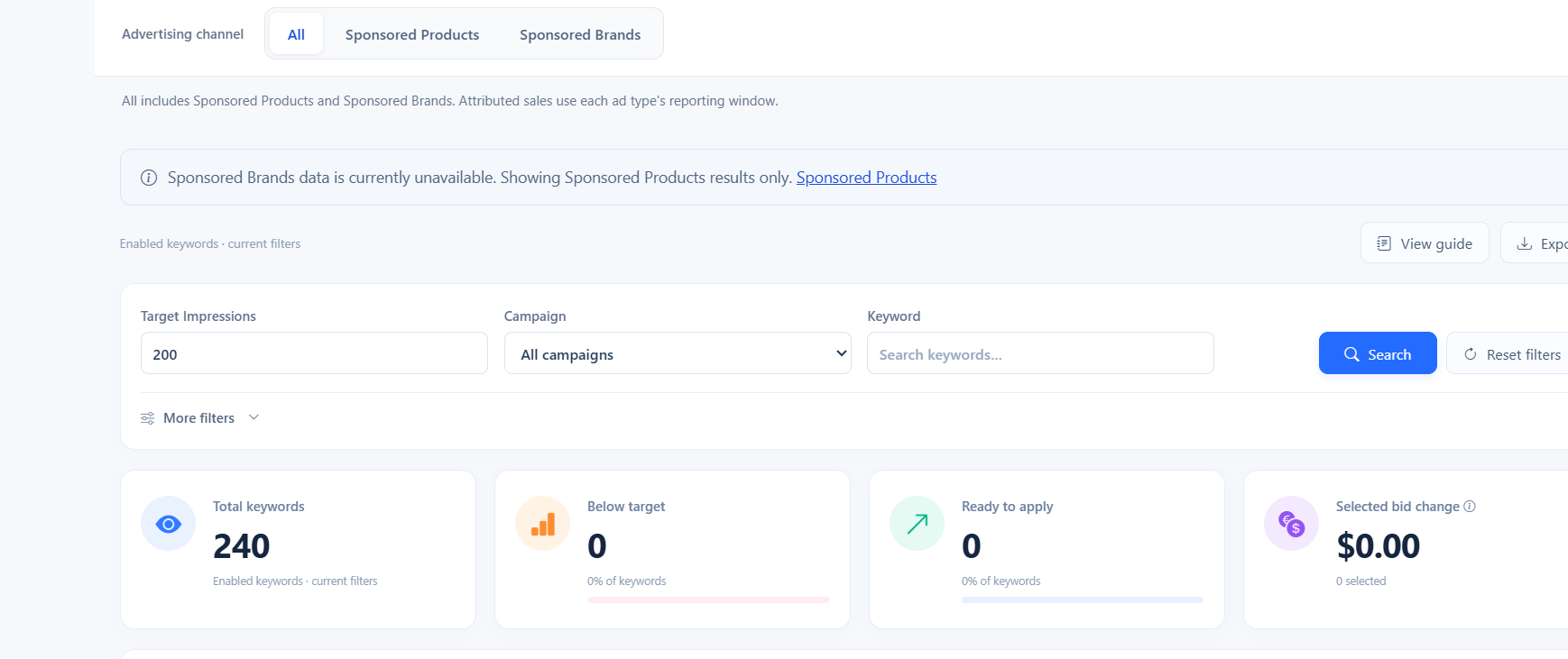
- Target Impressions: 200
- Enabled keywords: 240
- Below target: 0 (0% of keywords)
- Ready to apply: 0 (0% of keywords)
- Selected bid change: $0.00 (0 selected)
3. You should first check the channel display
At the top of the screen, there was this notice: "Sponsored Brands data is currently unavailable. Showing Sponsored Products results only." This means the results you see now only reflect Sponsored Products. Even if the channel selection is "All," the actual aggregated scope may be narrow.
4. The "—" in the table is not an error
If you open a row, you may find that previous/current impressions are displayed as — and the Status is Unavailable. This means there is no impression period to compare yet. In this state, no recommended bid will be displayed either. You should not interpret the absence of numbers as "no problem," but rather as "insufficient input."
- — : No comparable impression history
- Unavailable : Recommendation calculation not possible
- Ready to apply 0 : No changes to apply now
5. How to use it step by step
- First, check the period. Short periods are mostly filled with —.
- Check which ad types were actually aggregated.
- See if the "Below target" number changes.
- Select targets with "Select Eligible" and apply with "Apply Selected."
- If you save the list with Export before applying, you can compare it with the next period.
6. Frequently asked questions
Q. If "Below target" is 0, are all keywords normal?
No. Cases where there is no impression history and thus no calculation are also counted as 0. Please check the Status in the table as well.
No. Cases where there is no impression history and thus no calculation are also counted as 0. Please check the Status in the table as well.
Q. How should I use the recommended bid?
This is a calculated value for keywords that fall short of the target impressions. Please check your margins and inventory before applying it as is.
This is a calculated value for keywords that fall short of the target impressions. Please check your margins and inventory before applying it as is.
Q. Why are Sponsored Brands excluded?
At that time, SB data was not available, so only SP data was displayed. You can query again when the data becomes available.
At that time, SB data was not available, so only SP data was displayed. You can query again when the data becomes available.
Q. Why is Export necessary?
If you save the current values, you can compare whether impressions actually recovered in the next period.
If you save the current values, you can compare whether impressions actually recovered in the next period.
Q. Which keywords should I prioritize?
Start with keywords whose impressions have fallen but have a conversion history. Raising bids for keywords without conversions will only increase costs.
Start with keywords whose impressions have fallen but have a conversion history. Raising bids for keywords without conversions will only increase costs.
7. Note
- Displayed values vary depending on the query time and period.
- During periods without SB data, only SP results are shown.
- The figures in the main text are based on a query on 2026-10-23 and a period of 2026-10-09 ~ 2026-10-22.
Conclusion
When impressions fall, what's needed is not a higher bid, but identifying which keywords fell and why. Today, start by checking only the period and channel display. Those two lines will be the standard for interpreting the remaining numbers.
To check Target Impression Bid Recovery directly, you can create an account at sellervisor.com and then open it from the Ads menu.