Amazon sellers are asked "What do you use?" several times a day. From community comments, seller group chats, YouTube comments, to offline meetings. However, until now, most of those recommendations have disappeared without a trace. Write an answer, paste a link, and that's it. With the introduction of My Referrals on SellerVisor, these recommendations turn into recurring monthly revenue.
This article is a user guide compiled by opening each screen in an actual SellerVisor account. We openly disclose the current status of our account without hiding anything. 0 referrals, 0% commission rate. It's quicker to understand by first seeing what the starting point looks like.
1. Which Sellers Benefit Most?
The referral program is not equally beneficial for all sellers. It makes sense if you fall into the categories below.
- Sellers who frequently mention tools in communities, group chats, or YouTube.
- Sellers who naturally introduce tools while consulting or educating.
- Those who compare accounts with fellow team members or acquaintances and recommend tools.
Conversely, if you've never made a recommendation and have no plans to, this feature will be practically useless. We do not recommend forced promotion. The referral system is structured to provide rewards only to those who are already making recommendations.
2. Tier Structure and Two Rules
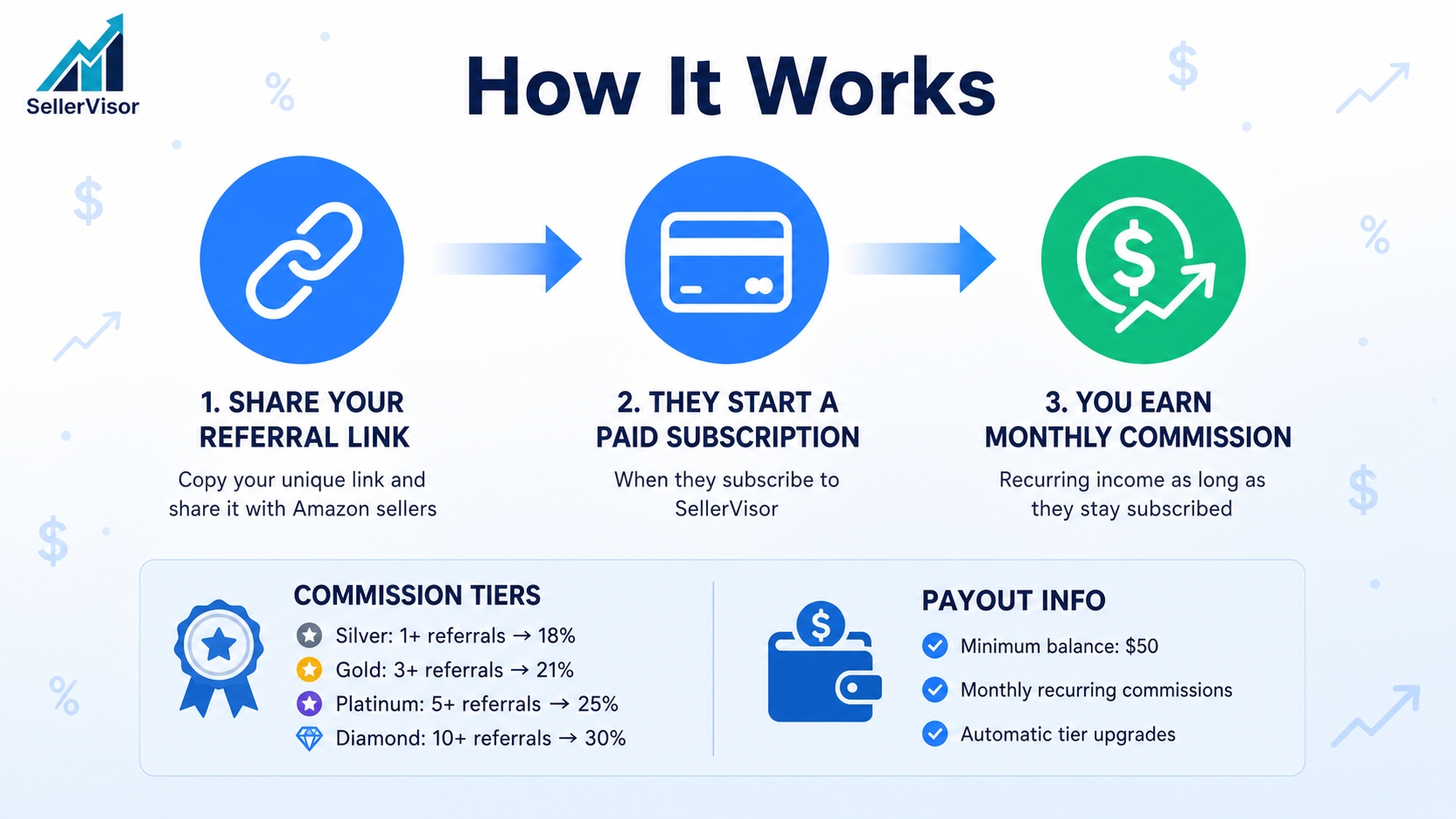
The commission rate is determined not by the number of people you referred, but by the number of referred users who started a paid subscription. There are four tiers.
- Silver - 1 or more · 18%
- Gold - 3 or more · 21%
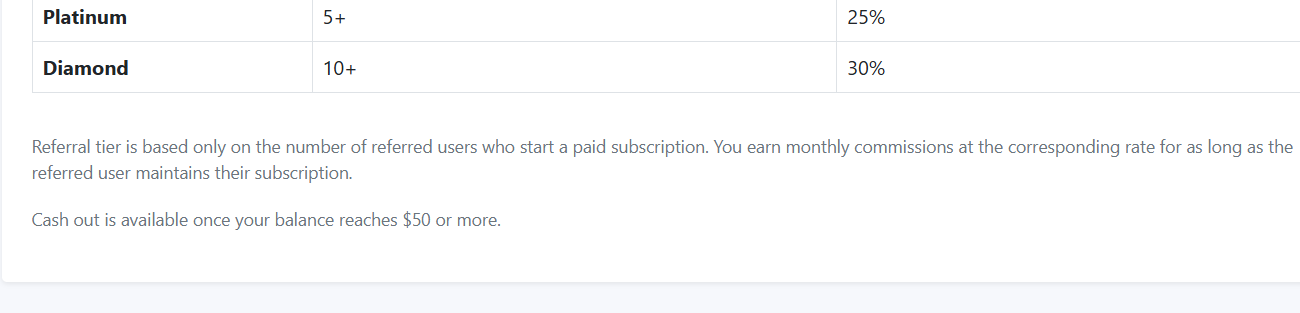
- Platinum - 5 or more · 25%
- Diamond - 10 or more · 30%
Here are two points that are easy to get confused about. First, tiers do not increase with free sign-ups alone. Only referred users who start a paid subscription are counted. Second, the commission is not a one-time payment; it accrues monthly as long as the referred user maintains their subscription. Therefore, post-referral management is important.
Payouts can be requested once the balance reaches $50 or more.
3. Actual Usage Steps
After logging in to SellerVisor, go to Account > My Referrals. The address is
/Account/MyReferrals. The screen is arranged from top to bottom with Status Summary, Referral Link, Referred User Management, Tier Table, and Rule Explanation.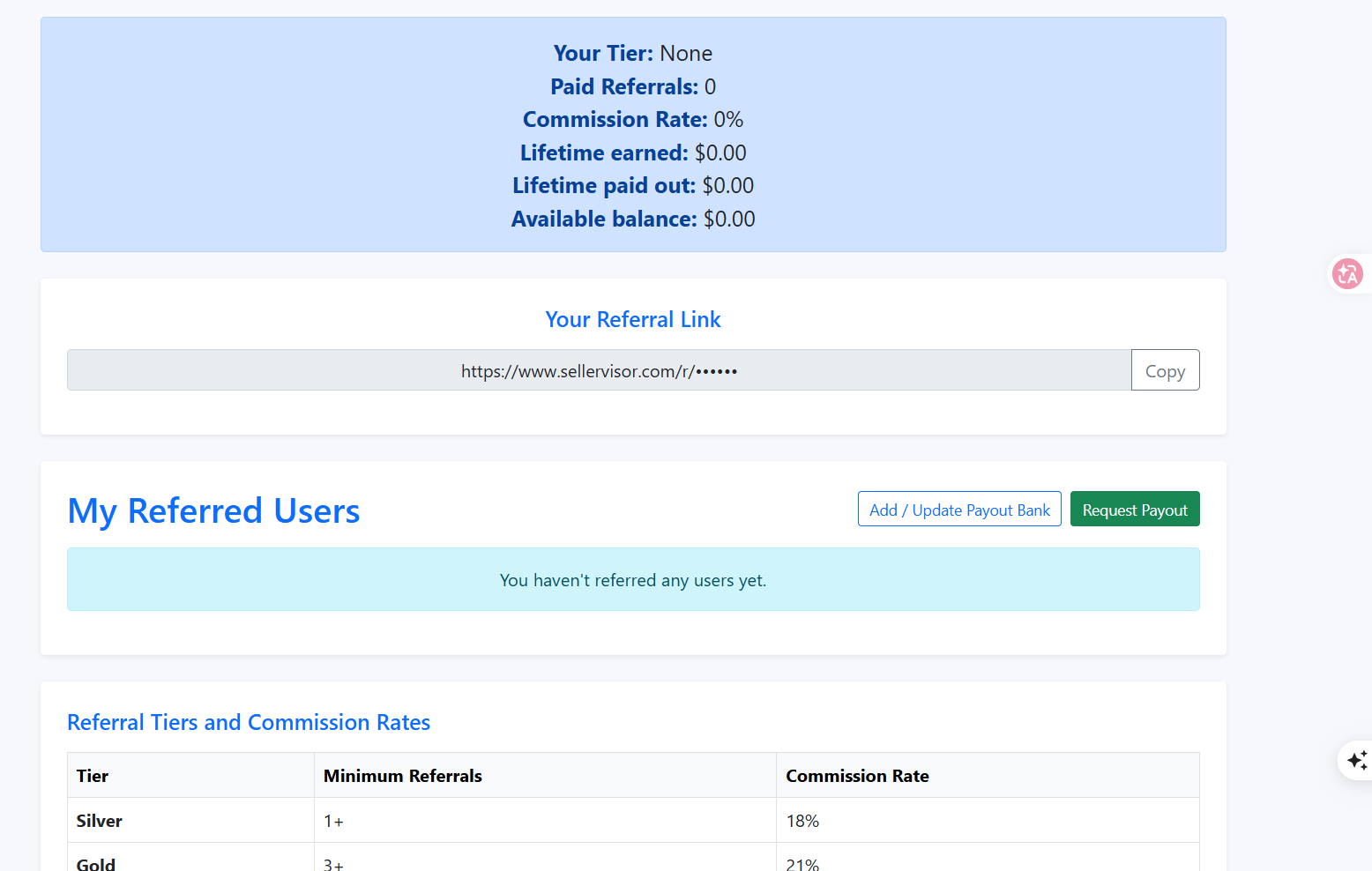
Step 1. Check Current Status
On the summary card at the top, you can see your tier, number of referrals, commission rate, lifetime earned, lifetime paid out, and available balance all at once. When you first start, all will be displayed as 0.

Step 2. Copy Referral Link
Clicking the Copy button in the Your Referral Link section copies the link to the clipboard. Users who sign up through this link will be connected as your referrals. Since a unique link is issued for each account, using someone else's link will not track your performance.

Step 3. Manage Referred Users and Enter Payout Information
When a referral is created, it will appear in the My Referred Users list. If there are no referrals yet, an empty status message will be displayed. To receive commissions, you must register a payout account via Add / Update Payout Bank, and if your balance exceeds $50, you can request a withdrawal via Request Payout.

Step 4. Check Tiers and Calculation Criteria
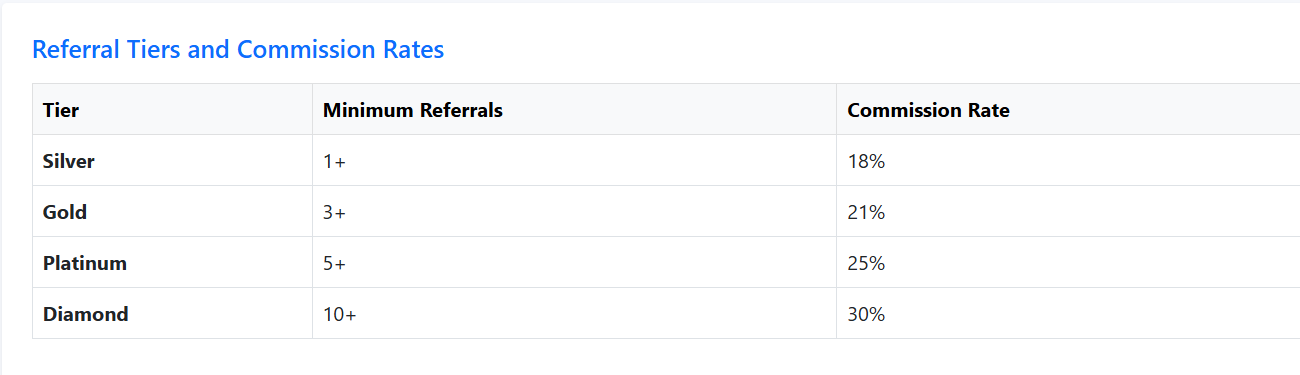
In the table below, you can reconfirm the minimum number of referred users and commission rate for each tier. Since referrals are automatically tallied when they start a subscription, there's nothing additional to register.
Step 5. Check Payout Rules
The notice below the table emphasizes two points. Tiers are based solely on the number of referred users who started a paid subscription, and the commission at the corresponding rate accrues monthly as long as the referred user maintains their subscription. The payout condition is a balance of $50 or more.
4. Actual Numbers for Our Account
An article that only provides a guide and hides our account is not helpful. As of today, the values on the My Referrals screen for the SellerVisor operational account are as follows:
- Your Tier: None
- Paid Referrals: 0
- Commission Rate: 0%
- Lifetime earned: $0.00
- Lifetime paid out: $0.00
- Available balance: $0.00
There are no referral achievements, and the message "You haven't referred any users yet." is still displayed on the page. After sharing the link, we will continue to check on the same screen to see if these numbers change when paid subscribers emerge. We believe it's better to share interim results without omission.
5. Frequently Asked Questions
Q. How is the commission rate determined?
Tiers are determined by the number of referred users who started a paid subscription, and tier-specific rates are applied. Silver 18%, Gold 21%, Platinum 25%, Diamond 30%.
Tiers are determined by the number of referred users who started a paid subscription, and tier-specific rates are applied. Silver 18%, Gold 21%, Platinum 25%, Diamond 30%.
Q. Are free sign-ups counted as performance?
No. Free sign-ups are not counted, only referred users who start a paid subscription are included in tier calculation.
No. Free sign-ups are not counted, only referred users who start a paid subscription are included in tier calculation.
Q. Do I receive commission only once?
No. It accrues monthly at the applicable rate as long as the referred user maintains their subscription.
No. It accrues monthly at the applicable rate as long as the referred user maintains their subscription.
Q. When can I request a payout?
You can request a payout via Request Payout when your balance is $50 or more.
You can request a payout via Request Payout when your balance is $50 or more.
Q. Where can I find my referral link?
It's in the Your Referral Link section of My Referrals. You can copy and share it with the Copy button.
It's in the Your Referral Link section of My Referrals. You can copy and share it with the Copy button.
Q. What happens if a referred user cancels their subscription?
Monthly commissions for that referred user will cease. Tiers are also recalculated based on the number of active paid subscribers.
Monthly commissions for that referred user will cease. Tiers are also recalculated based on the number of active paid subscribers.
6. Note
- Tier criteria, commission rates, and minimum payout amounts are displayed on the My Referrals page and may change according to policy. Please check the page for the latest values before actual application.
- Tax and accounting treatment of commission income varies depending on the country and business type, so it is safe to consult with a tax professional.
- Please conduct referral activities only within the scope of SellerVisor's Terms of Service. Spamming, bulk sending, or false reviews may lead to account suspension.
Conclusion
The referral program is not an elaborate marketing scheme, but a feature that adds rewards to recommendations you're already making. Simply copy the link once and send it as usual to sellers who ask about tools. Our account also starts today by sharing the link.
To check out SellerVisor's My Referrals yourself, you can request a demo. Create an account at sellervisor.com and go to Account > My Referrals to check it immediately.