Hello. Thank you to all customers who use SellerVisor.
Before running a review request campaign, there's something you need to check: what existing reviews love and what they dislike. SellerVisor's Review Intelligence separates these two, showing you both and even suggesting the order of what to fix first.
1. Questions this screen answers
The description at the top of the screen says: "Understand what customers love, what hurts ratings, and what to fix before requesting more reviews." In other words, it's a tool to first organize your strengths, weaknesses, and order of fixes before requesting more reviews.
2. Readiness — Can you increase review requests now?
The first value you see is the readiness status. The current values for our account are as follows:
- Readiness: Caution
- Score: 65
- Review health: 65 · Status: Ready
- Top booster: Ease Of Use (Rating impact +1.8)
- Top reducer: Size-Overall (Rating impact -0.1)
A score of 65 and a 'Caution' status means there are areas that need improvement before increasing requests.
3. Customer Loves — Reflecting strengths in your listing
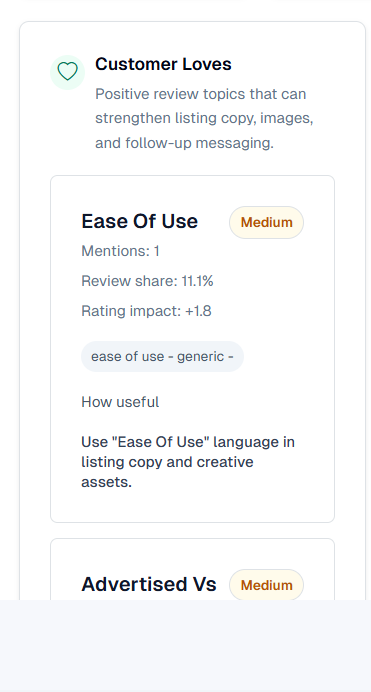
This organizes recurring themes from positive reviews. Each item shows mentions, review share, and rating impact.
- Ease Of Use — Mentions 1 · Review share 11.1% · Rating impact +1.8
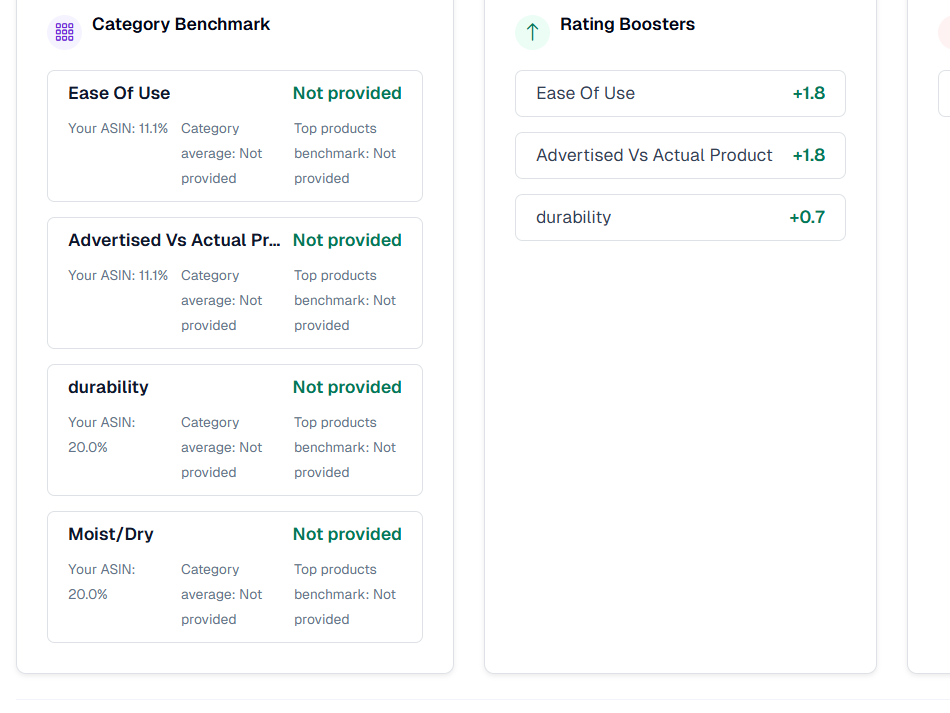
- Advertised Vs Actual Product — Review share 11.1% · +1.8
- Durability — Review share 20.0% · +0.7
- Moist/Dry — Review share 20.0% · +0.7
These themes are suitable for direct incorporation into bullet points, images, and A+ content. In fact, the screen advises: "Use "Ease Of Use" language in listing copy and creative assets."
4. Customer Complaints — Identifying weaknesses first
Negative review themes also appear in the same format. For our account, only one, Size-Overall, was identified.
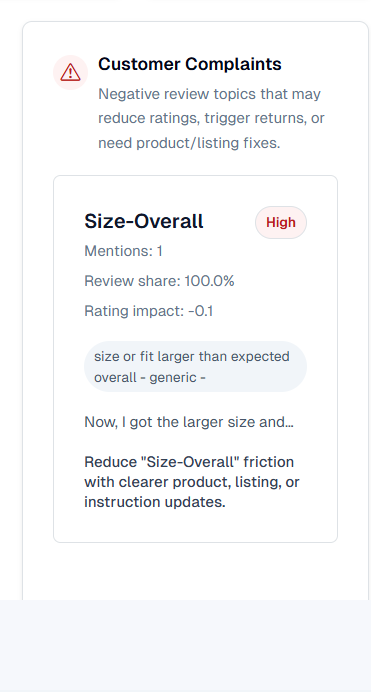
- Size-Overall — Mentions 1 · Review share 100.0% · Rating impact -0.1 · High
A review share of 100% means that this product effectively has only one negatively classified theme. The screen also suggests improvement directions, such as "Reduce Size-Overall friction with clearer product, listing, or instruction updates."
5. Rating Boosters and Reducers — Prioritizing with numbers
The same data is re-sorted based on rating impact.
- Rating Boosters: Ease Of Use +1.8, Advertised Vs Actual Product +1.8, Durability +0.7
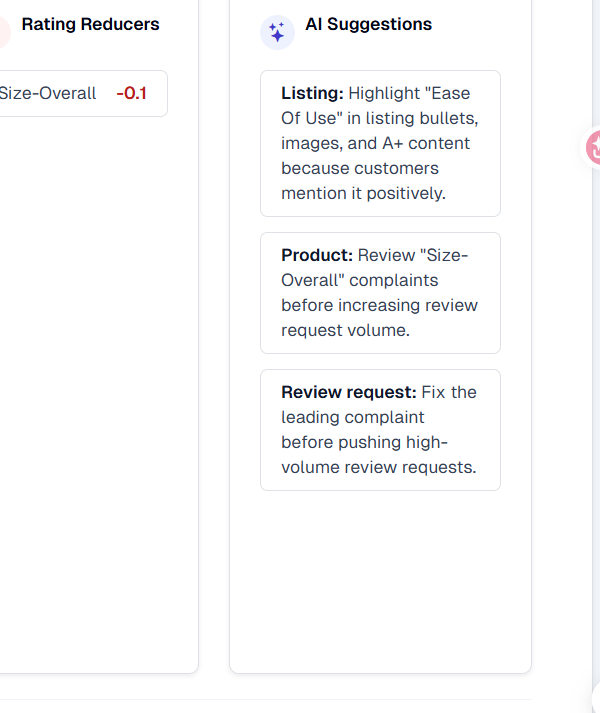
- Rating Reducers: Size-Overall -0.1
Strengths go up to +1.8, while weaknesses are at -0.1. This means that "what to promote" has a greater impact than "what to fix," which is why the first line of AI suggestions also recommends reflecting strengths in the listing.
6. AI Suggestions — Execution order
The screen suggests three things in order:
- Listing — "Highlight "Ease Of Use" in listing bullets, images, and A+ content because customers mention it positively."
- Product — "Review "Size-Overall" complaints before increasing review request volume."
- Review request — "Fix the leading complaint before pushing high-volume review requests."
The key is the last sentence. If you push high-volume requests before fixing the leading complaint, the same complaints will only accumulate further.
7. Data Criteria and Updates
The data period for this screen is 4/20/2026 - 10/20/2026. It is updated daily on the Scale plan and can be manually refreshed when needed.
- Period: 4/20/2026 - 10/20/2026
- Update: Scale plan daily automatic updates + manual refresh possible
8. Frequently Asked Questions
Q. Can I use it even with few reviews?
Themes with as few as 1 mention are displayed. When the sample size is small, view it for reference only and check again as more reviews accumulate.
Themes with as few as 1 mention are displayed. When the sample size is small, view it for reference only and check again as more reviews accumulate.
Q. What does Review share mean?
It is the proportion of the total reviews that a particular theme accounts for. Size-Overall 100.0% can be interpreted to mean that it is virtually the only negative theme.
It is the proportion of the total reviews that a particular theme accounts for. Size-Overall 100.0% can be interpreted to mean that it is virtually the only negative theme.
Q. How do I use Rating impact?
It is the rating contribution by theme. +1.8 indicates a strength, and -0.1 indicates a weakness. You should address those with the larger absolute values first.
It is the rating contribution by theme. +1.8 indicates a strength, and -0.1 indicates a weakness. You should address those with the larger absolute values first.
Q. How is it different from review request automation?
Automation is a function that sends requests, while Review Intelligence is a screen that helps you decide what to fix before sending them.
Automation is a function that sends requests, while Review Intelligence is a screen that helps you decide what to fix before sending them.
Q. What if the data is empty?
This happens if there are not enough reviews within the period or if they haven't been synchronized yet. Please refresh and check again.
This happens if there are not enough reviews within the period or if they haven't been synchronized yet. Please refresh and check again.
9. Notes
- For themes with small sample sizes, do not conclude definitively but observe trends before making judgments.
- It is safer to increase the volume of review requests after fixing complaint themes.
- Theme classification and metric definitions are based on Amazon review data, and screen values may change.
Conclusion
Knowing what to fix is more important than simply increasing reviews. Review Intelligence shows you this judgment with numbers. Today, we recommend checking your product's Top reducer and reflecting that theme in your listing.
To check out Review Intelligence for yourself, you can request a demo. After creating an account at sellervisor.com, navigate to the Review Requests & Intelligence > Review Intelligence tab to view it directly.