Hello. Thank you to our customers for using SellerVisor.
The place where ad spend leaks is not the total number of campaigns, but a single keyword line. SellerVisor's Keyword Intelligence divides the same report into three sections, showing keywords that are currently making money and keywords that are only consuming money on one screen.
1. This 7-Day Summary
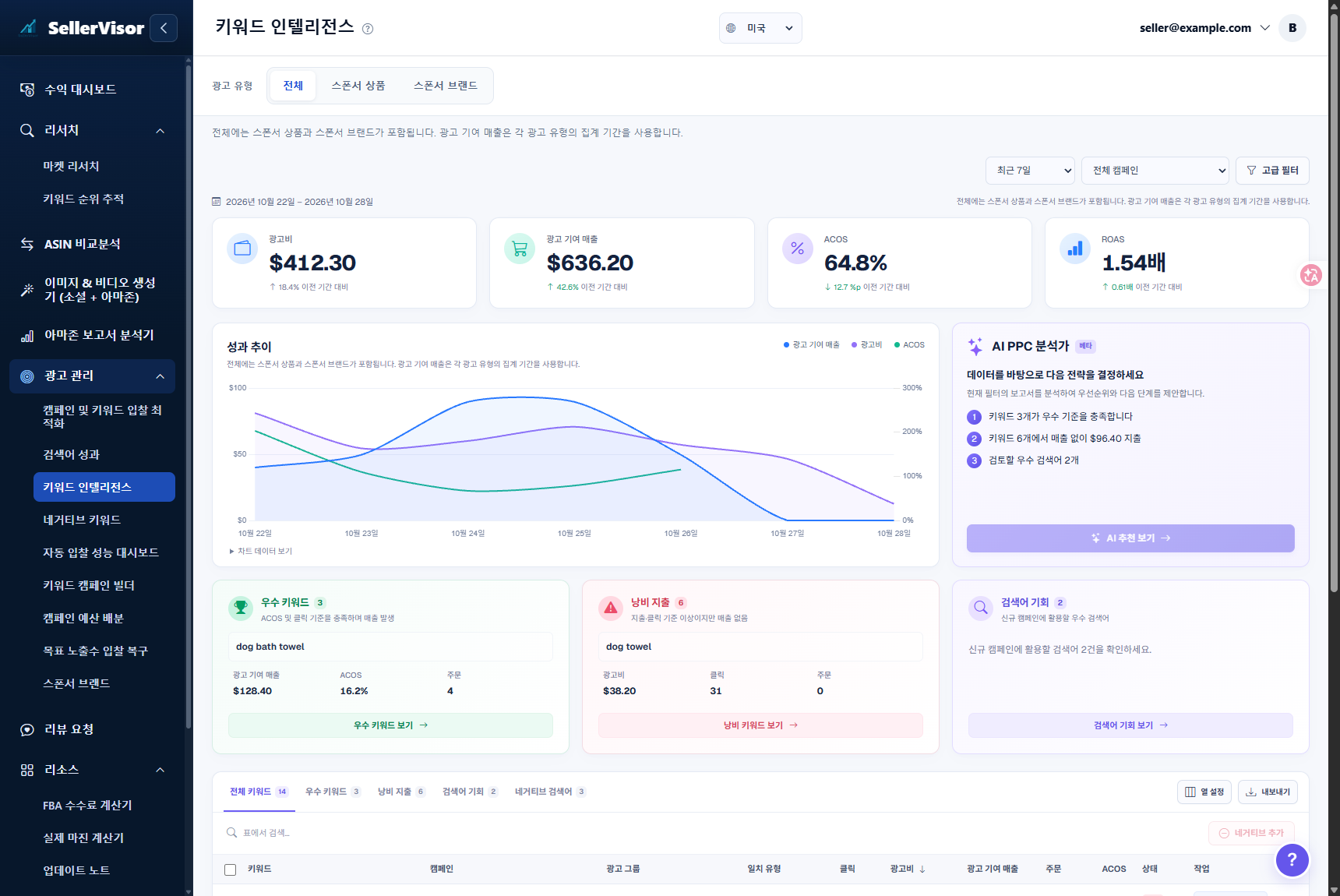
As of October 28, 2026, based on the last 7 days (2026-10-22 ~ 2026-10-28) and all campaigns.
- Ad Spend: $412.30 (18.4% increase compared to the previous period)
- Ad-Attributed Sales: $636.20 (42.6% increase)
- ACoS: 64.8% (12.7%p improvement)
- ROAS: 1.54x (0.61x improvement)
- Excellent Keywords 3 · Wasted Spend 6 ($96.40) · Search Term Opportunities 2
The number to pay attention to is not ACoS, but $96.40. This is the amount spent by 6 keywords with zero sales in a week. When looking only at the campaign-level total, this money appears to be "normal ad spend."
2. AI PPC Analyst Summarizes First
The AI PPC Analyst (Beta) on the right side of the screen reads the current filtered report and presents priorities in sentences.
- "3 keywords meet the excellent criteria" — Keywords that passed ACoS and click criteria and generated sales
- "$96.40 spent without sales from 6 keywords" — Keywords that exceeded click/spend criteria but had 0 orders
- "2 excellent search terms to review" — Search terms suitable for new campaigns
It's like deciding where to look before reading the table row by row.
3. What Distinguishes Excellent Keywords from Wasted Keywords?
The criteria are simple. If clicks/spend exceed a certain threshold but sales are 0, it's wasted; if ACoS is within the target and sales are attached, it's excellent.
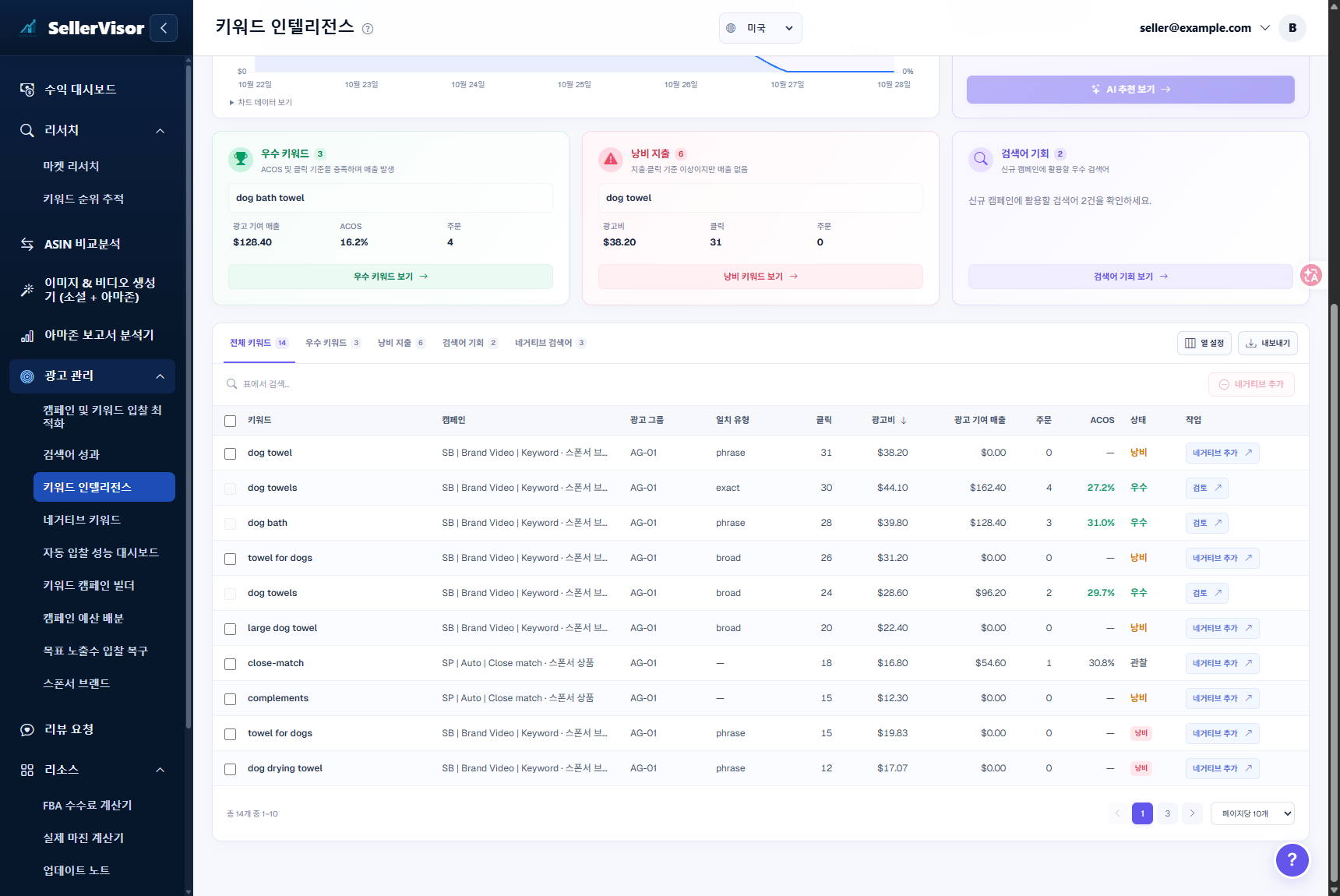
- Example of Excellent Keyword: ACoS 16.2%, 4 orders, Ad-attributed sales $128.40
- Example of Wasted Keyword: 31 clicks, Ad spend $38.20, 0 orders
What's important here is not the judgment, but that the next action is on the same screen. The status column displays Wasted/Observed/Excellent, and an Add Negative button is immediately attached to wasted rows.
4. Execution Order
- Select the period and campaign. Initially, all campaigns + last 7 days is a good starting point.
- First, read the AI PPC Analyst's three sentences.
- Go to the Wasted Spend tab and check in order of largest spend.
- Select only search terms unrelated to your product and click Add Negative.
- Check if the same keywords have disappeared in the next period.
5. Points to Note When Reading Numbers
- Ad spend and sales are based on ad attribution for the selected period. This differs from total sales.
- The total includes Sponsored Products and Sponsored Brands, and ad-attributed sales follow the aggregation period for each ad type.
- Excellent/wasted judgment is the result of observations within the period. It may be reversed in the next period depending on seasonality or inventory status.
- Don't permanently exclude immediately if sales are 0; first check if the search term is a variation of your product.
6. Frequently Asked Questions
Q. If I add a negative, will that keyword be completely turned off?
It is excluded at the search term level. It also checks if it overlaps with exclusions already registered within the campaign/ad group scope.
It is excluded at the search term level. It also checks if it overlaps with exclusions already registered within the campaign/ad group scope.
Q. How do I increase excellent keywords?
It's faster to reduce waste first. This is because impressions are concentrated on keywords that generate conversions within the same budget.
It's faster to reduce waste first. This is because impressions are concentrated on keywords that generate conversions within the same budget.
Q. What are search term opportunities?
These are search terms that are not yet in campaigns but have exceeded performance criteria. They are used as candidates for new campaigns or expanded keywords.
These are search terms that are not yet in campaigns but have exceeded performance criteria. They are used as candidates for new campaigns or expanded keywords.
Q. How often should I check it?
Once a week is enough. If you're receiving weekly reports, open it then.
Once a week is enough. If you're receiving weekly reports, open it then.
7. Reference
- The figures in the main text are based on a view on October 28, 2026, for the last 7 days (2026-10-22 ~ 2026-10-28), and all campaigns.
- Figures vary depending on the view date, period, and campaign selection.
- Account, campaign, and ad group identification information has been obscured in the images.
Conclusion
You have one task this week. Open Keyword Intelligence and check only the top 5 keywords with the largest spend in the Wasted Spend tab. Most can be resolved with a single click.
To check directly, create an account at sellervisor.com and open Ad Management → Keyword Intelligence.