Hello. Thank you to all customers who use SellerVisor.
Sponsored Brands (hereinafter SB) ads have until now been viewed separately from Sponsored Products. SB campaign data lookup has started in SellerVisor's Revenue Dashboard and Campaign & Keyword Bid Optimization. By simply changing the ad type, you can compare SB's ad spend, ACoS, and ROAS side-by-side with Sponsored Products on the same screen.
1. What has changed?
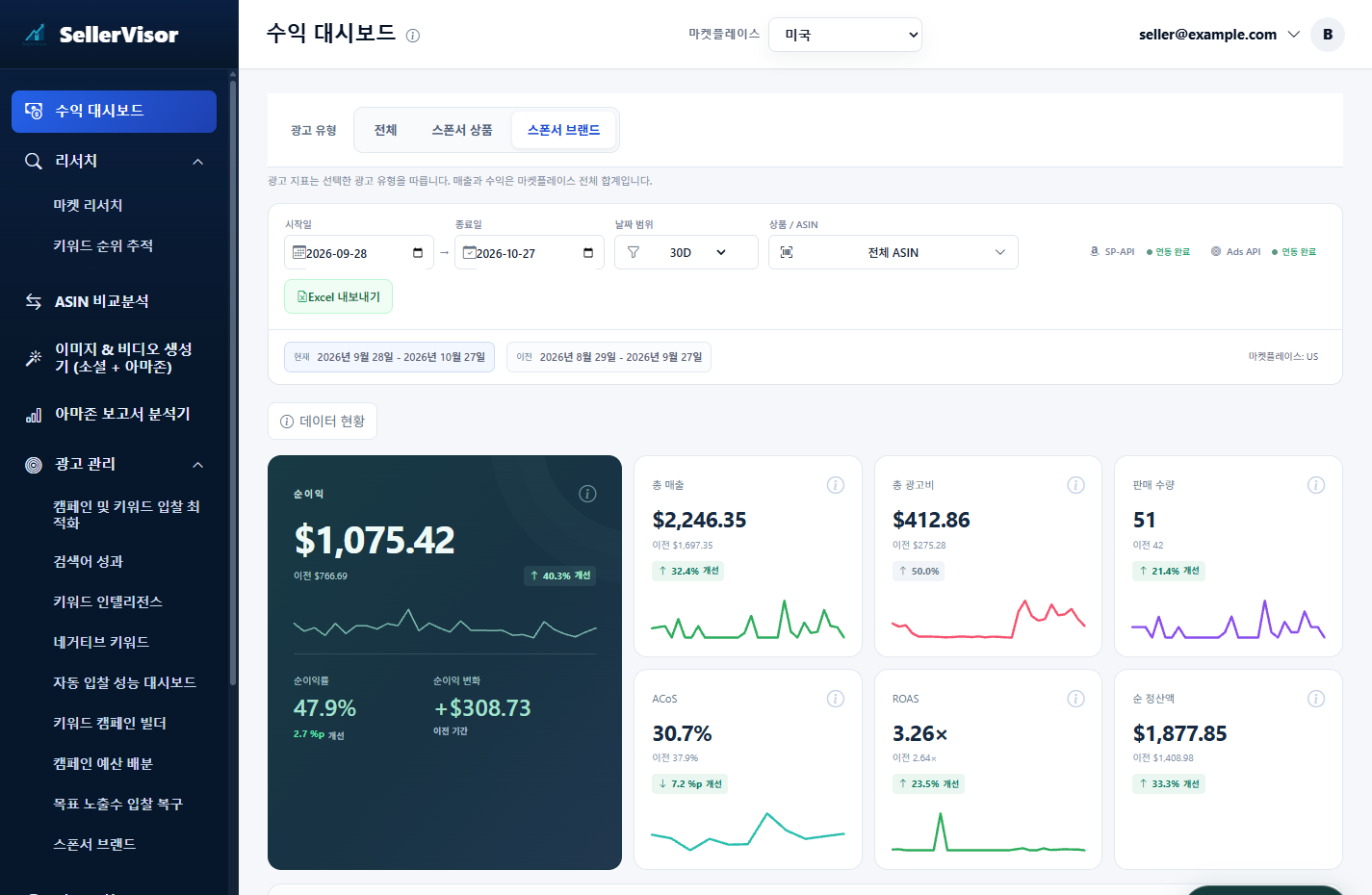
A Ad Type selection has been added to the top of the Revenue Dashboard. There are three buttons: All · Sponsored Products · Sponsored Brands.
The criteria displayed on the screen is one line: "Ad metrics follow the selected ad type. Sales and profit are the total for the entire marketplace."
Therefore, each card has a different characteristic.
- Ad Spend · ACoS · ROAS → These are numbers for the type you selected. If you choose Sponsored Brands, only SB will be calculated.
- Sales · Net Profit · Net Settlement Amount · Sales Quantity → These are totals for the entire marketplace.
- All → This is the combined value of Sponsored Products and Sponsored Brands.
The same toggle has been added to Campaign & Keyword Bid Optimization. SB campaigns and SB targets (keyword/product targets) appear in the list, and are processed in the same flow as Sponsored Products, including period comparison, bid increase/decrease review, and adding negatives from spending without sales.
The Ad Management menu also has a dedicated screen for Sponsored Brands. It has the same structure as Sponsored Products, including Overview, Campaign & Bid Optimization, Search Term Performance, Keyword Analysis, Negative Keywords, Bid Automation, Campaign Budget, Impression Opportunities, Create Campaign, Ad Creative, and Revenue Preview.
2. 30-Day Summary
Based on data retrieved on October 28, 2026, for the US marketplace, Ad Type Sponsored Brands, period 2026-09-28 ~ 2026-10-27.
- SB Ad Spend: $412.86 (previous $275.28)
- ACoS: 30.7% (previous 37.9%, 7.2%p improvement)
- ROAS: 3.26x (previous 2.64x)
- Total Sales: $2,246.35 (previous $1,697.35, 32.4% increase)
- Net Profit: $1,075.42 (previous $766.69, 40.3% improvement), Net Profit Margin 47.9%
- Units Sold: 51 (previous 42)
3. How to read SB in the Revenue Dashboard
- In Ad Type, click Sponsored Brands. The three ad cards will change to SB criteria.
- Also check the "previous" value on the card. The previous period of the same length is automatically calculated. E.g.: ACoS 37.9% → 30.7%.
- In Revenue Composition, check the Ad Spend Ratio. Comparing the ratios by switching between Sponsored Brands and Sponsored Products will show which channel cuts more into profit.
Be sure to check the units. ACoS, CTR, and Conversion Rate are in %p, Average CPC is in %, and ROAS is in multiples. At the bottom of the bid optimization screen, it also states: "Lower ACoS and CPC are better · pp = percentage points".
4. Handling SB in Campaign & Keyword Bid Optimization
If you select Sponsored Brands in the same toggle, only SB campaigns remain. As of the lookup time, 4 campaigns and 57 keywords/targets were identified.
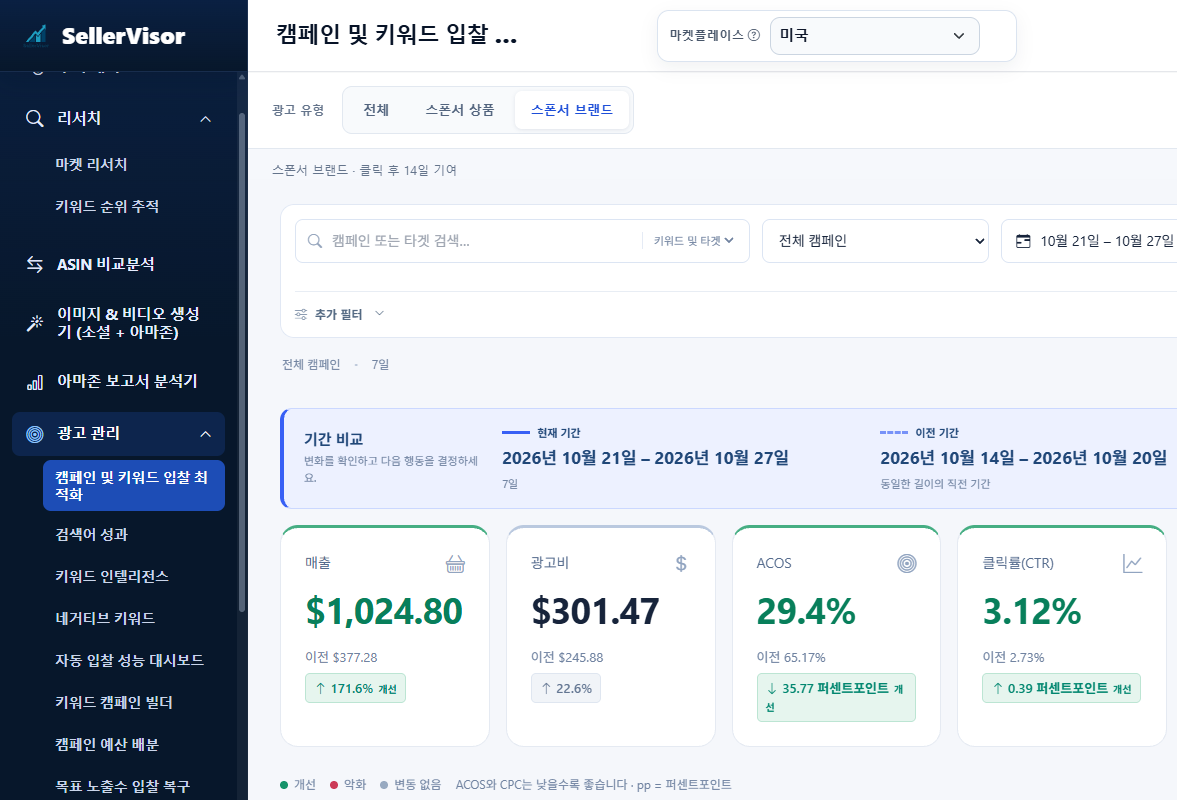
The Period Comparison at the top shows the current 7 days and the preceding 7 days side-by-side. The card order is Sales · Ad Spend · ACoS · CTR · Purchases · Clicks · Impressions · Average CPC · Conversion Rate.
Example (2026-10-21 ~ 2026-10-27, Sponsored Brands):
- Sales $1,024.80 (previous $377.28)
- Ad Spend $301.47 (previous $245.88)
- ACoS 29.4% (previous 65.17%)
- Purchases 18 (previous 7), Conversion Rate 6.57% (previous 3.72%)
- Average CPC $1.10 (previous $1.31)
- Spending without sales $18.42
The three buttons below lead to actual actions. These are Review Bid Decreases, Review Bid Increases, and Spending without Sales → Add Negative. Since SB is most effective when segmented by search term and product target, it's quicker to start with spending without sales.
One note: The "Profit" item for SB campaigns was marked as Unavailable in this lookup. Please check profit by type in the Net Profit card of the Revenue Dashboard.
5. Points to Note When Reading Numbers
- Sales and profit are overall totals, while ad metrics are for the selected type only. Missing this distinction can lead to the incorrect conclusion that "profit increased because SB was activated."
- Ad-attributed sales use an attribution model specific to each type. On the Sponsored Brands screen, SB_CLICK_14D (based on 14 days after click) is displayed together.
- The Data Status button in the Revenue Dashboard tells you which dates settlement/fees have not yet been synchronized for. In this lookup, 4 days were empty. Missing days are not 0, but "values that have not yet arrived."
- On the Sponsored Brands Overview screen, the notice "Some reports are incomplete. Missing data does not mean 0 performance" is fixed. In the report collection scope, campaigns, ad groups, ads, targets, and search terms were marked as complete, while placements were marked as partially complete.
- Today's attributed sales are provisional. If you open the same period again a few days later, the numbers may be slightly different.
6. Frequently Asked Questions
Q. If I select All, are SB and SP combined?
Yes, they are combined. Sales and profit are originally totals for the entire marketplace.
Yes, they are combined. Sales and profit are originally totals for the entire marketplace.
Q. I only want to see SB.
Select Sponsored Brands in Ad Type. The method is the same for both the Revenue Dashboard and Bid Optimization.
Select Sponsored Brands in Ad Type. The method is the same for both the Revenue Dashboard and Bid Optimization.
Q. ACoS has improved, but net profit remains the same.
The populations for the two values are different. ACoS is for the selected type, while net profit is for the overall total. You need to look at the Net Profit card and the Ad Spend Ratio together.
The populations for the two values are different. ACoS is for the selected type, while net profit is for the overall total. You need to look at the Net Profit card and the Ad Spend Ratio together.
Q. I don't see SB data.
Check if SB campaigns are actually running and if the Ads API integration status at the top is complete. It's also possible that report collection is only partially complete.
Check if SB campaigns are actually running and if the Ads API integration status at the top is complete. It's also possible that report collection is only partially complete.
Q. The numbers are slightly different on each screen.
This is because the period and aggregation time are different. Check the period attached to each card.
This is because the period and aggregation time are different. Check the period attached to each card.
7. Reference
- The figures in the main text are based on data retrieved on October 28, 2026.
- Revenue Dashboard: 2026-09-28 ~ 2026-10-27 (30D), Comparison period 2026-08-29 ~ 2026-09-27, US, Ad Type Sponsored Brands.
- Bid Optimization: 2026-10-21 ~ 2026-10-27, Comparison period 2026-10-14 ~ 2026-10-20, US, Ad Type Sponsored Brands.
- Identifying information such as account names and campaign names have been obscured in the images.
Conclusion
SB ads have always been "campaigns viewed separately." Now, by simply changing the type in the Revenue Dashboard, they are displayed side-by-side for the same period and with the same criteria. There's one thing to do this week: Change the ad type to Sponsored Brands to check ACoS and ROAS, and open "Spending without Sales" in Bid Optimization to organize SB search terms and targets.
To check it yourself, create an account at sellervisor.com and then open the Ad Management menu.