Product Target Bid Control Enhancement
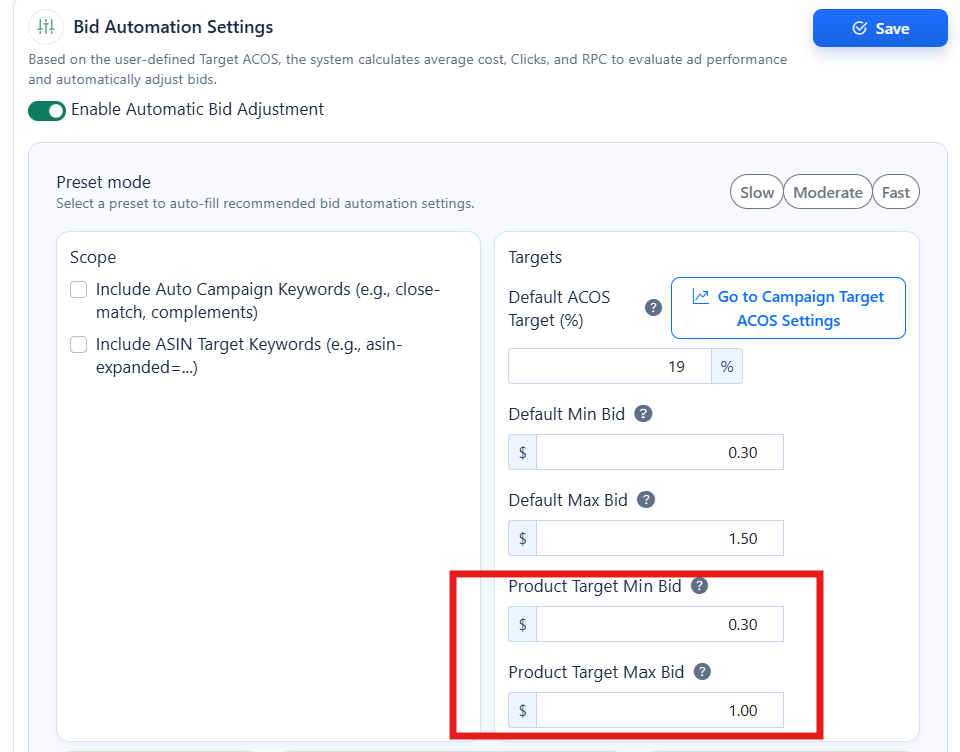
Implemented configurable Minimum Bid and Maximum Bid limits for Product Target campaigns to improve bid optimization control and campaign stability. Key Improvements Added support for defining: Minimum Bid Price Maximum Bid Price Applied bid constraints during automatic Product Target bid adjustments. Prevents bids from: dropping below profitable thresholds increasing beyond safe spending limits Helps maintain: better ACOS control safer automation behavior more predictable campaign performance Purpose This enhancement allows users to set protective bid boundaries for Product Target campaigns while still benefiting from automated bid optimization logic.
Created: 5/28/2026 1:08:21 AM
Updated: 5/28/2026 1:08:21 AM
🖼️ Image Editing Feature with Prompt Control & Credit Preview
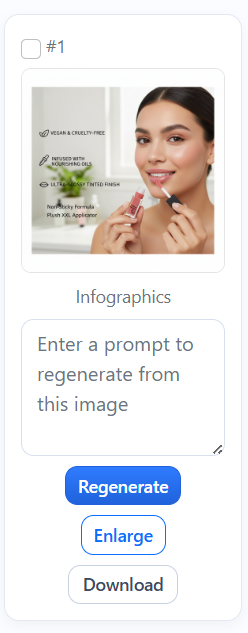
We’ve introduced a powerful new editing feature that allows you to modify both single and multiple images using customizable prompts. With this update, you can: Apply a unique prompt to an individual image for precise, one-off edits. Or use a shared prompt across multiple selected images , enabling consistent edits at scale. To use the shared prompt functionality, simply select the images you want to edit , then apply your prompt once—it will be executed across all selected images. In addition, we’ve enhanced transparency around usage by introducing a credit preview modal . Before generating or editing images, this modal will clearly display: The number of credits required The total cost based on your selection and prompt scope This ensures you have full visibility and control over your usage before proceeding, helping you manage resources more efficiently and avoid unexpected charges.
Created: 4/13/2026 1:33:18 AM
Updated: 4/13/2026 1:33:18 AM
📊 Major Update: Profit Tracking, KPI Insights & Faster Campaign Creation
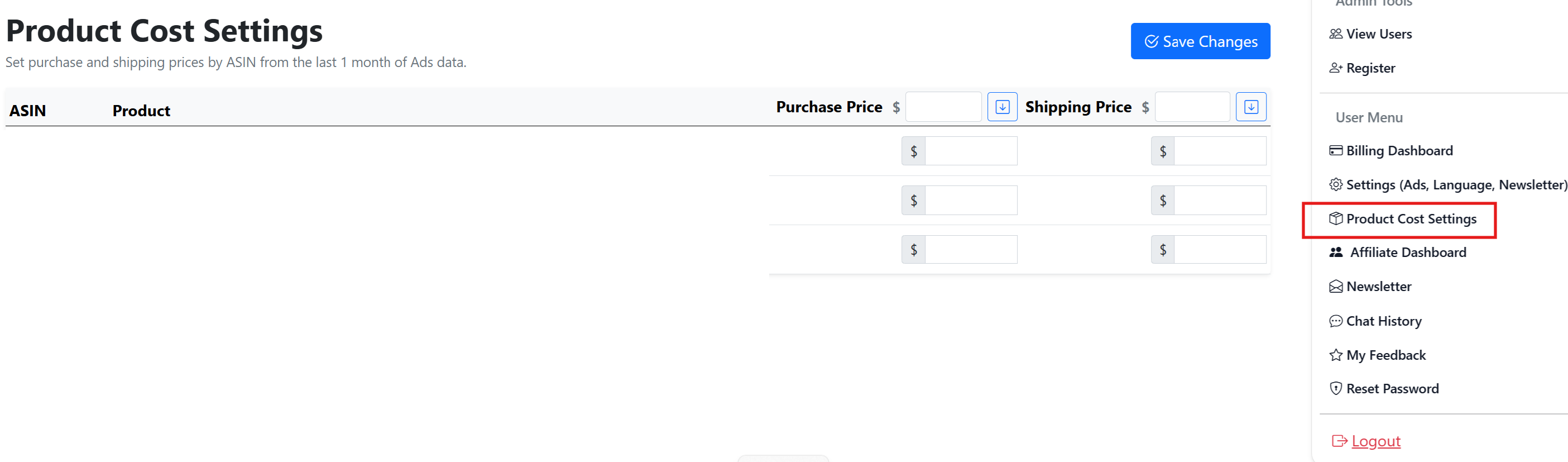
We’ve introduced several important improvements to help you better understand your advertising performance, optimize campaigns faster, and calculate more accurate profitability. 💰 Product Cost Settings for Accurate Profit Calculation A new Product Cost Settings page has been added under the Settings section. This feature allows you to enter your product purchase cost and shipping cost for each ASIN. Once these costs are provided, the platform can calculate your true profit more accurately by factoring in ad spend along with your product and shipping costs . This helps you understand the real financial performance of your advertising campaigns rather than relying only on revenue metrics. Currently, ASINs become available in this section once they have generated activity within the last 30 days , ensuring that only recently active products appear in the list. 📈 Enhanced Campaign & Keyword Optimization Dashboard The Campaign & Keyword Optimization page has been upgraded with a clearer KPI Snapshot to help you quickly analyze performance trends. The dashboard now highlights key metrics including: Sales Profit ACOS Purchases Ad Spend (Cost) Clicks Conversion Rate Average CPC Each metric now shows current vs. previous period comparisons , making it easy to identify improvements or declines in performance at a glance. Additionally, the system now surfaces actionable insights such as: 🔥 High Opportunity Keywords – search terms with strong potential sales opportunities. 💸 Wasted Ad Spend – keywords generating spend without conversions so you can quickly add negatives. ⚠️ ACOS Rising Alerts – campaigns or keyword groups where ACOS has significantly increased. These insights help you quickly identify where to scale profitable keywords and reduce inefficient ad spend . 🚀 Manual Campaign Creation from High-Performing Search Terms A new feature has been added to the Keyword & Search Term Quality page that allows you to create manual campaigns directly from high-performing search terms . If the system detects search terms with strong conversion potential, you can now launch a campaign instantly with one click , eliminating the need to manually copy keywords into a new campaign. This makes it much faster to scale winning search terms into dedicated manual campaigns. These updates are designed to help you track real profitability, identify optimization opportunities faster, and scale successful keywords with minimal effort.
Created: 3/17/2026 1:27:43 AM
Updated: 3/17/2026 1:27:43 AM
🚀 Ads Automation Improvements: Minimum Bid Protection & Faster Negative Keyword Management
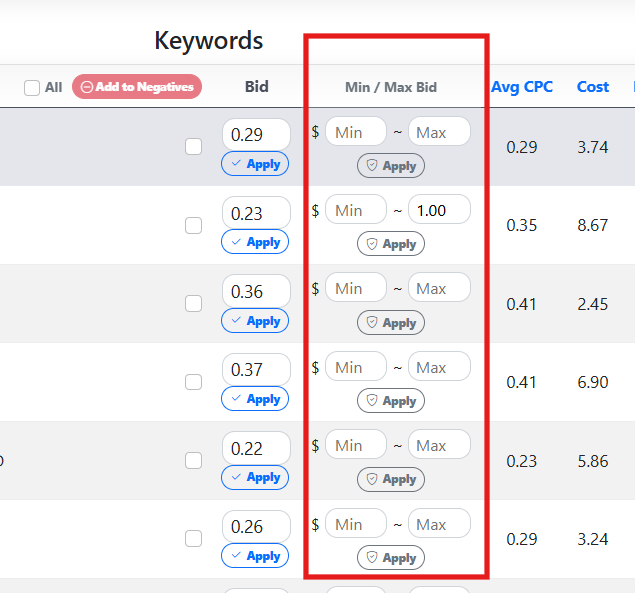
Minimum Bid Protection for Automated Bidding A minimum bid price safeguard has been added to Ads automation to prevent bids from dropping too low during automated optimization. You can now: Set a custom minimum bid for each individual keyword from the Campaign & Keyword Bid Optimization page giving you precise control over important keywords. If no keyword-specific minimum is configured, the system will automatically apply the default minimum bid setting defined in your Ads automation settings. This ensures that automated bid adjustments will never reduce bids below your defined safety level , helping prevent: Loss of impressions Reduced ad visibility Underbidding important keywords By maintaining a minimum bid floor, automation can still optimize performance while keeping campaigns competitive. Add Negative Keywords Directly from the Keyword & Search Term Quality Page You can now add negative keywords directly from the Keyword & Search Term Quality page , allowing you to quickly remove keywords or search terms that waste advertising budget. This feature helps you immediately block terms that: Generate clicks but do not produce sales Consume ad budget unnecessarily Reduce campaign efficiency and increase ACOS Simply select the problematic keywords or search terms and click “Add to Negatives” to apply them directly to your campaign or ad group. This streamlined workflow makes it much easier to identify and eliminate wasted ad spend , improving overall campaign performance and profitability.
Created: 3/7/2026 5:17:35 AM
Updated: 3/7/2026 5:17:35 AM
🚀 New Ads Automation Presets + Improved Setting UI Experience
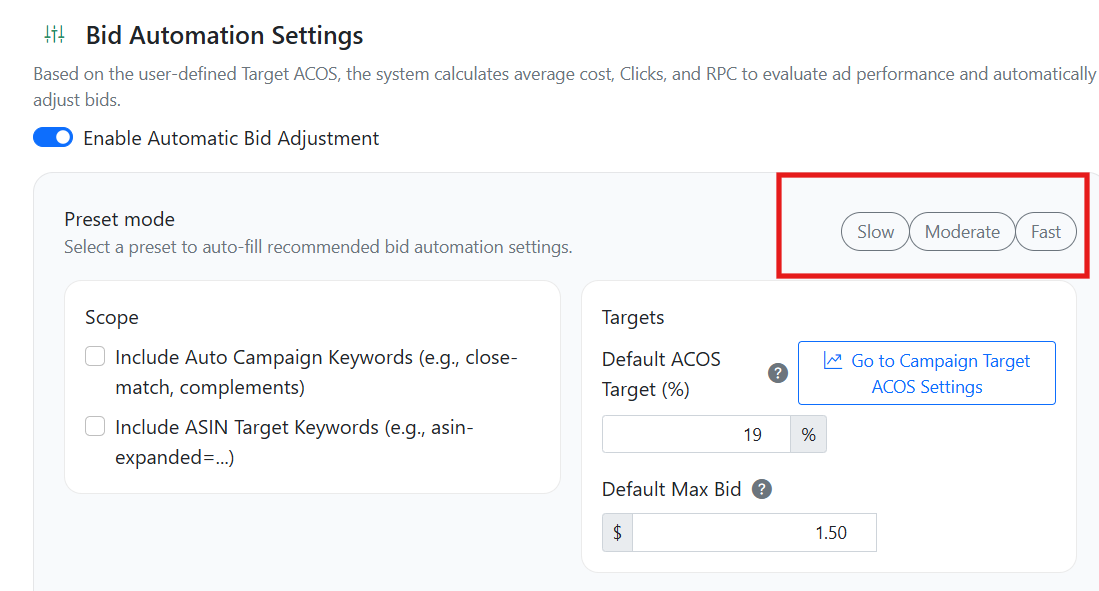
We’ve introduced Ads Automation Presets to make campaign optimization faster and easier—especially for new users. 🎯 Three Ready-to-Use Presets You can now choose from: Slow – Conservative adjustments with gradual bid changes. Ideal for stable campaigns where you want to minimize volatility. Moderate – Balanced optimization with steady improvements. A good default for most users. Fast – Aggressive bid adjustments designed to quickly respond to performance data and accelerate results. Instead of manually configuring every rule and threshold, new users can simply select a preset and launch automation immediately—no complex setup required. ⚙️ Full Customization Still Available While presets provide a strong starting point, you’re always in control. Every parameter (ACOS targets, bid multipliers, impression thresholds, timing rules, etc.) can be adjusted manually. You can fine-tune settings based on your product margin, risk tolerance, and campaign goals. We recommend testing different speeds to see what delivers the best performance for your specific niche and ad structure. Automation should adapt to your strategy—not the other way around. 👁️ Enhanced Settings UI We’ve also updated the automation settings interface for better visibility and clarity : Cleaner layout Improved grouping of controls Easier-to-read values and thresholds More intuitive interaction The new design helps you understand exactly how your automation is configured at a glance, reducing setup time and preventing misconfiguration.
Created: 2/27/2026 12:12:02 AM
Updated: 2/27/2026 12:12:02 AM
Smart Bid Optimization & Ads Newsletter Insights
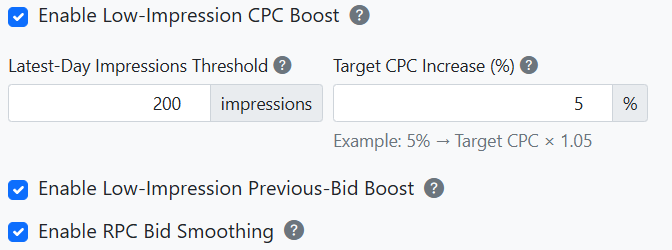
This feature helps improve your advertising performance by automatically stabilizing bid changes, increasing visibility for under-performing keywords, and providing AI-powered performance insights through the Ads Newsletter. When a keyword’s impressions fall below your configured minimum threshold, the system temporarily increases the bid based on the current (previous) bid using your Target CPC increase percentage. This helps gradually restore visibility and build impression volume without making aggressive changes based on limited data. Once impressions reach a stable level, the system does not immediately replace the current bid with the RPC-calculated bid. Instead, it gradually adjusts the bid toward the RPC-based value to prevent sudden traffic drops and maintain consistent campaign performance. The Ads Newsletter continuously monitors your campaigns and highlights keywords that require attention, such as those with very low or zero visibility. It also provides an AI-generated performance summary that explains trends, potential risks, and optimization opportunities in simple terms, helping you quickly understand and improve your advertising results. Result: More stable bidding, improved keyword visibility, and clear AI-driven insights into your advertising performance.
Created: 2/16/2026 2:32:26 AM
Updated: 2/16/2026 2:34:08 AM
Bid Automation Performance – UI Update
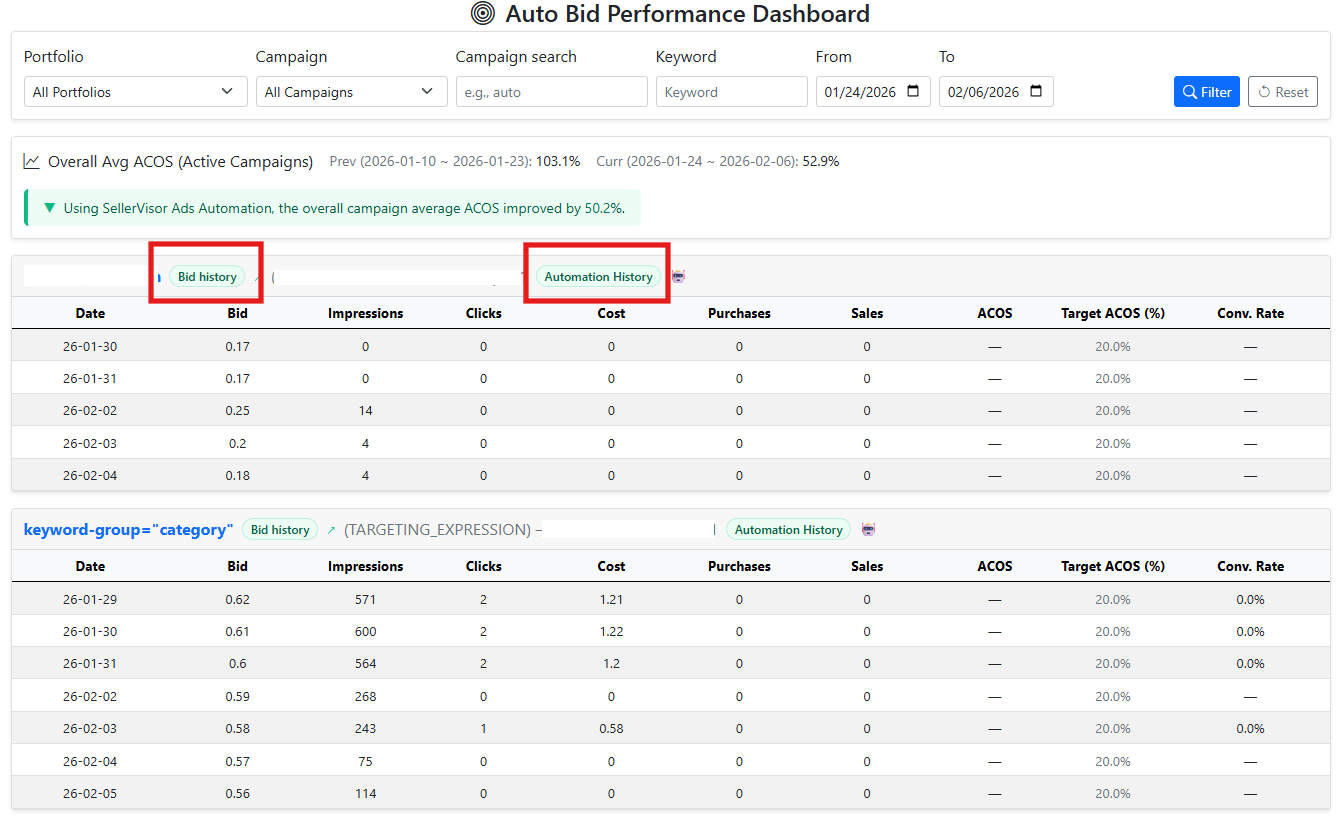
We’ve updated the Bid Automation Performance page to improve clarity and make bid behavior easier to analyze. Before The page primarily displayed automation history , focusing on when and why automated bid adjustments occurred. Now The main view shows bid history , allowing you to track how keyword bids changed over time, regardless of whether the change was manual or automated. Both Bid History and Automation History are still available and can be switched instantly using dedicated buttons. This update makes it easier to: Understand long-term bid trends at a glance Compare manual bid changes with automation-driven adjustments Validate automation decisions against actual bid movements Overall, the new layout provides a more complete and transparent view of how bids evolve, while still keeping automation insights one click away.
Created: 2/6/2026 10:29:19 PM
Updated: 2/6/2026 10:29:19 PM
📦 FBA Fee Calculator & Real Margin Calculator
1. FBA Fee Calculator This tool lets you instantly look up Amazon FBA fees using just an ASIN. How it works: Enter any product’s ASIN We automatically fetch the current Buy Box price and fee data The calculator breaks down: Selling Price Referral Fee FBA Fulfillment Fee Total Amazon Fees (with % of selling price) This gives you a fast and accurate fee estimate without needing to list the product yourself. 2. Real Margin Calculator This tool shows your true profit margin after Amazon fees and your own product costs. Two Input Modes: a) Use ASIN Mode Enter an ASIN We fetch the selling price + Amazon fees You enter your: Unit Product Cost Shipping Cost Margin and ROI are calculated automatically b) Manual Input Mode For products that don’t exist on Amazon or are not yet launched You manually set: Selling Price Referral % FBA Fee (optional) Your Costs This is useful for: ✔ New product research ✔ Cost planning ✔ Competitor evaluation ✔ Launch feasibility

Created: 1/23/2026 12:31:08 AM
Updated: 1/23/2026 12:31:08 AM
45 New Fashion Themes for Image Generator
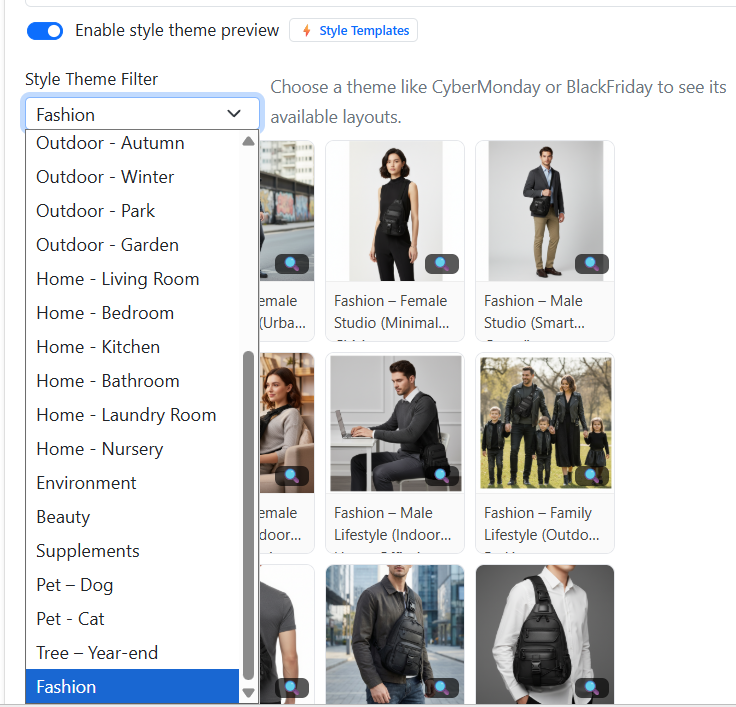
We’ve added 45 new fashion style themes to the Image Generator. This means you can now produce higher-quality and more on-brand visuals for your fashion products — perfect for Amazon listings, social media posts, and marketing campaigns. The expanded theme library covers streetwear, business casual, outdoor festival looks, winter and ski styles, studio athletic shots, and more, giving you much more creative flexibility when showcasing your apparel.
Created: 1/22/2026 12:08:36 AM
Updated: 1/22/2026 12:08:36 AM
Improved Workflow for Profit Analysis, SKU Costs, and Creative Prompts
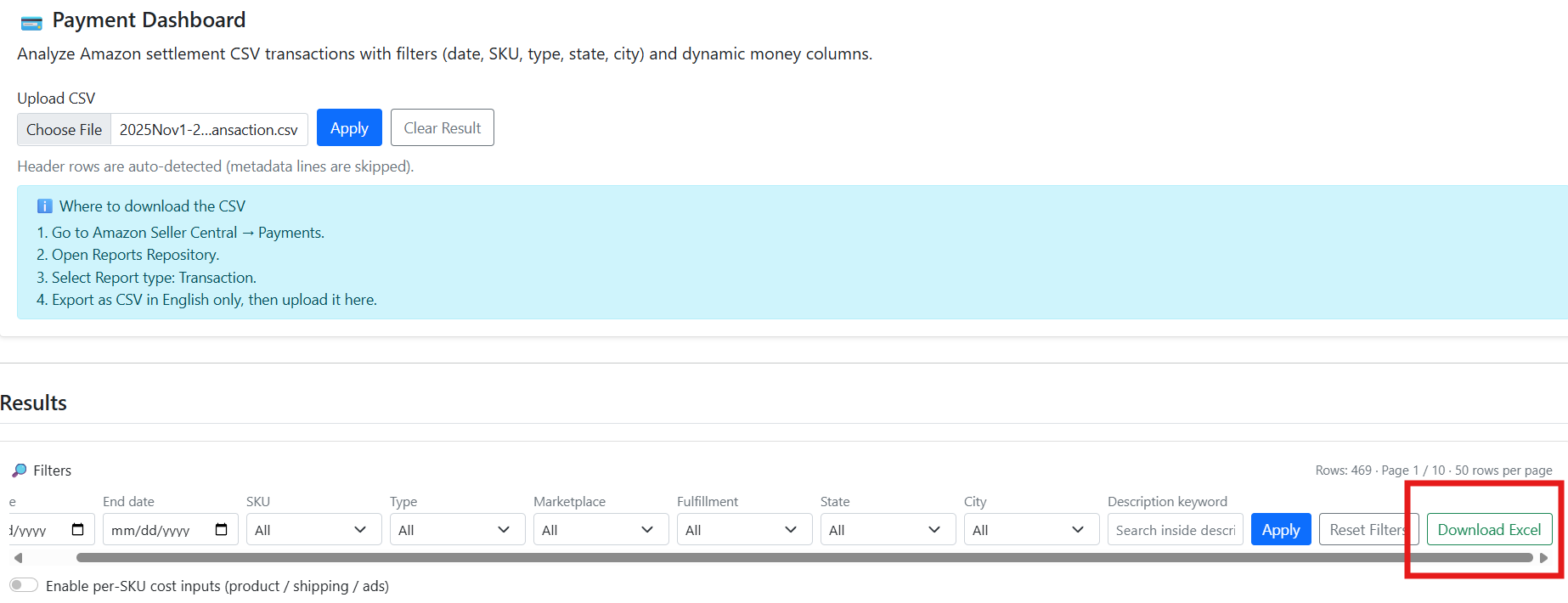
Payment Dashboard – Excel Export Added You can now export your filtered Payment Dashboard results directly to Excel. This makes it easy to back up raw data, share reports with your team, and run additional custom analysis (pivot tables, extra formulas, etc.) outside of SellerVisor while keeping the same filters you used on the screen. SKU Cost – Copy & Paste from Spreadsheet The SKU cost section now supports bulk copy & paste from Excel or Google Sheets. Just copy rows of Product Cost / Shipping Cost / Ads Cost from your spreadsheet and paste them into the cost table. Values will automatically fill down across SKUs, so you can update cost assumptions for many products in one shot instead of editing each field manually. Image Generator – Larger Custom Prompt Input The custom prompt field for the image generator has been upgraded to a larger, more readable input box. This gives you more space to write detailed prompts (tone, scene, angles, text overlays, etc.) without feeling cramped, helping you describe creative needs more clearly and generate better images with fewer retries.
Created: 1/17/2026 6:28:48 PM
Updated: 1/17/2026 6:28:48 PM
Tutorial Help Buttons on Every Main Page
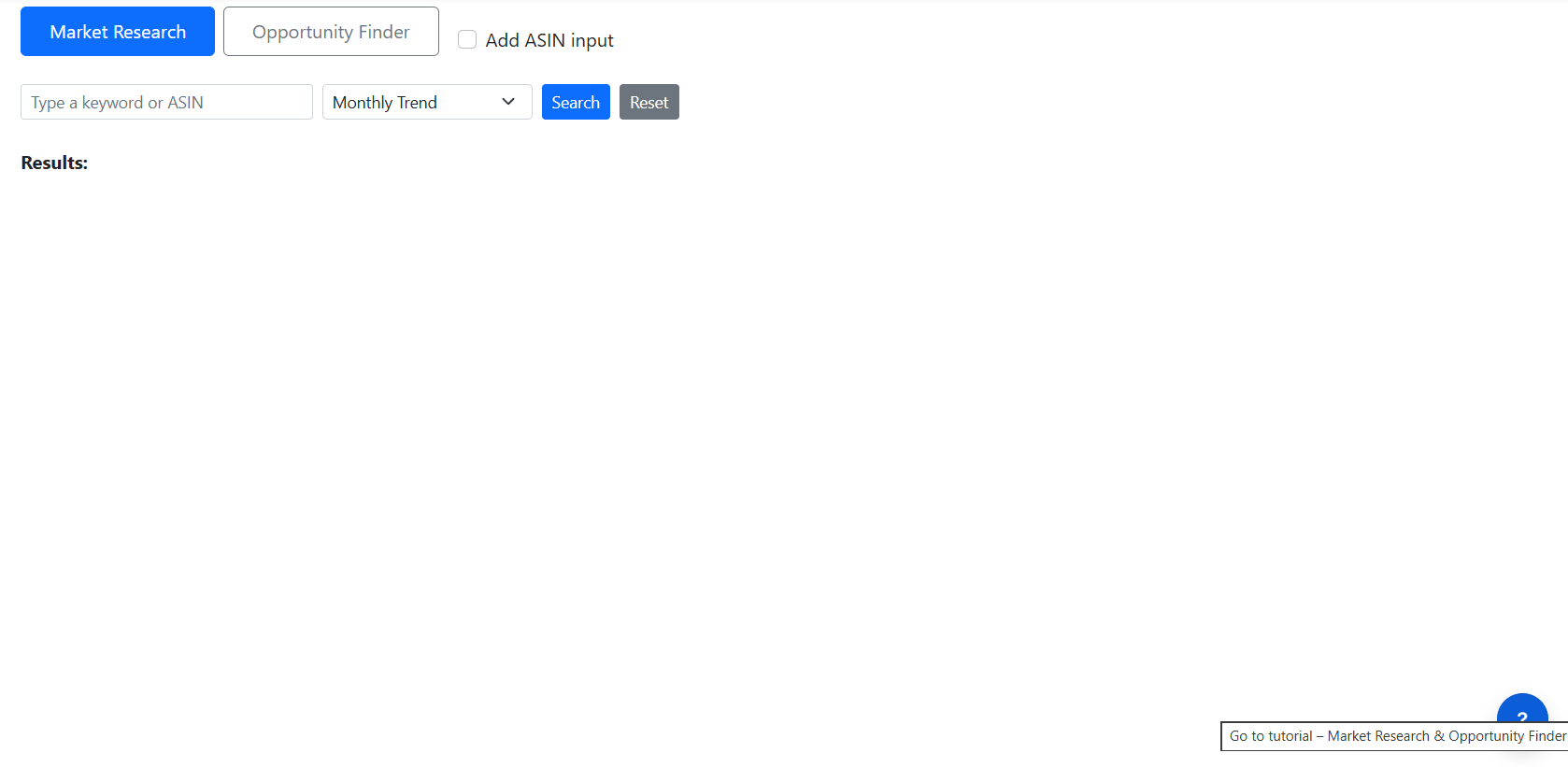
We’ve added contextual help buttons to all main feature pages. When clicked, these buttons take you directly to the relevant section of the tutorial, where you can find feature descriptions, usage instructions, best practices, and examples. This makes it easier to understand how each page works and how to apply the tools effectively.
Created: 1/12/2026 11:32:04 PM
Updated: 1/12/2026 11:32:04 PM
Market Research UI Update — Expanded Results & Flexible Report Preview
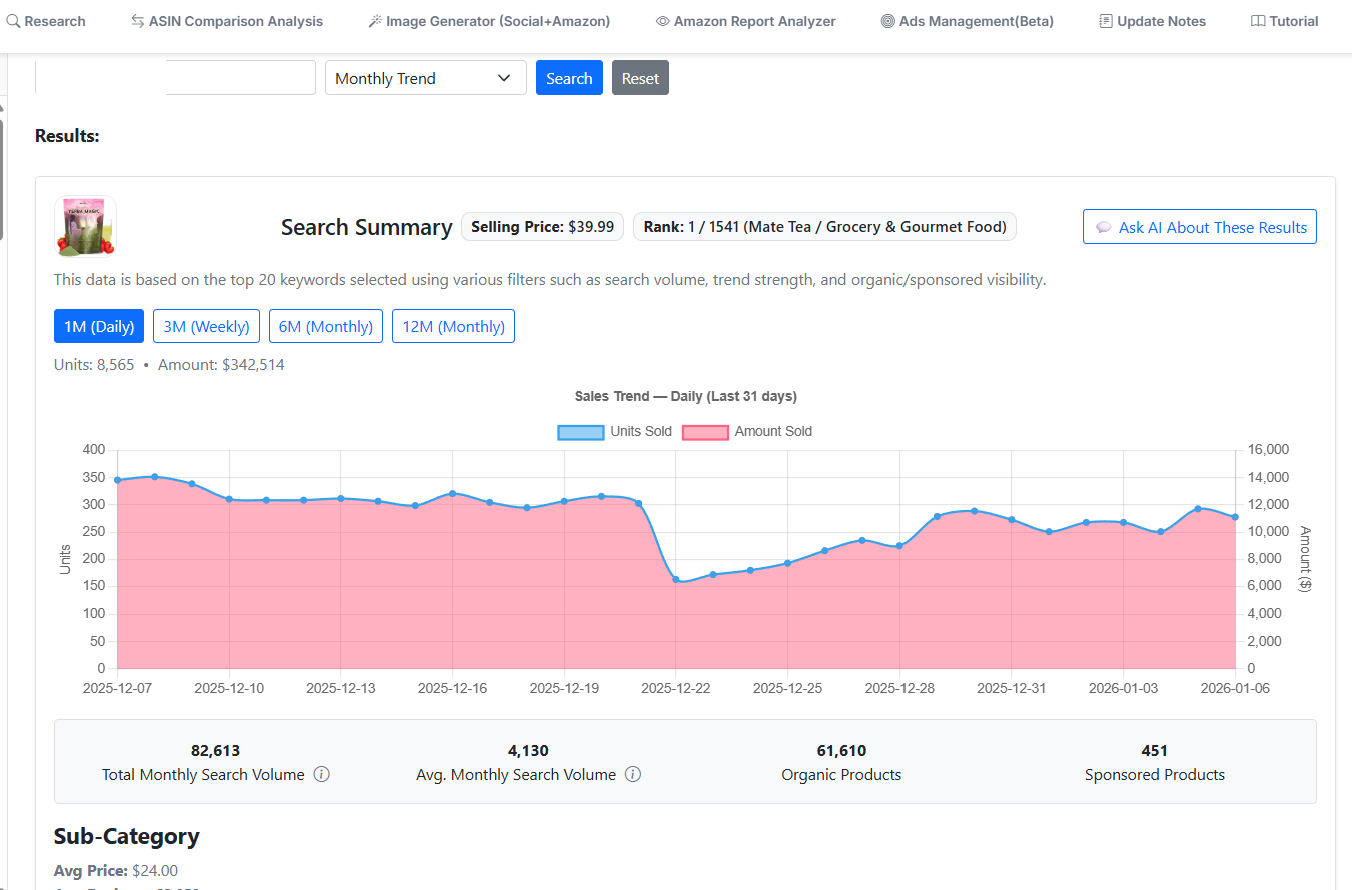
We’ve rolled out an updated Market Research UI that makes results clearer and more flexible when analyzing products or keywords. What’s new: Expanded Results Screen (Primary Search): When you search for a single ASIN or a keyword , the results now open in an expanded, full-detail view , making it easier to review insights at a glance. Report Preview Still Available: Clicking Generate Report continues to show the familiar report preview screen , so you can review the generated content before finalizing—no change to that workflow. Second ASIN Flow Unchanged: If you add a second ASIN for comparison, the UI behaves exactly as before , displaying the comparison screen you’re already used to. Why this matters: This update improves readability and focus for single-item research while preserving the existing report and comparison experience—giving you the best of both without disrupting your current workflow.
Created: 1/7/2026 2:11:40 AM
Updated: 1/7/2026 2:11:40 AM
Clone & Style Theme Generation (Enhanced Workflow)
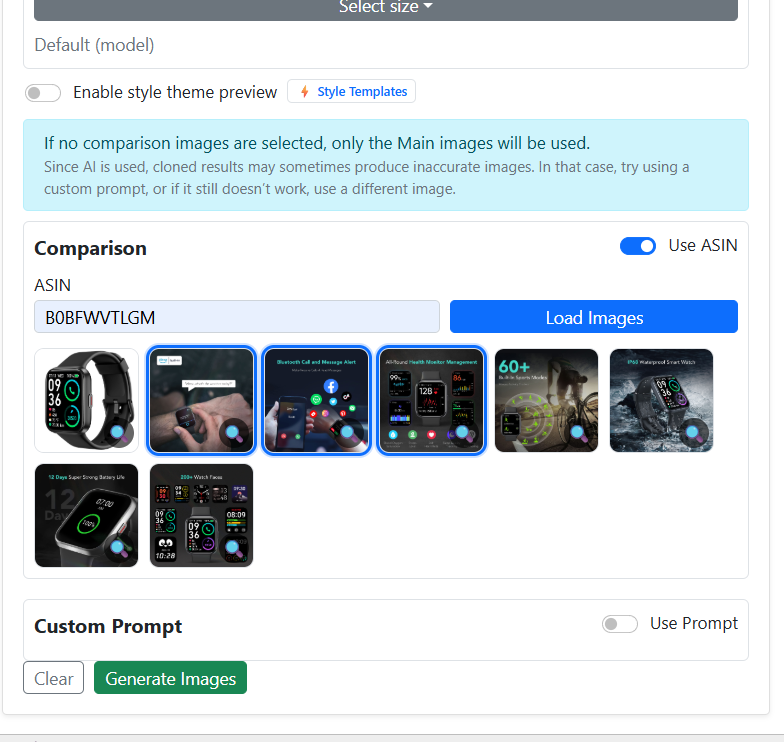
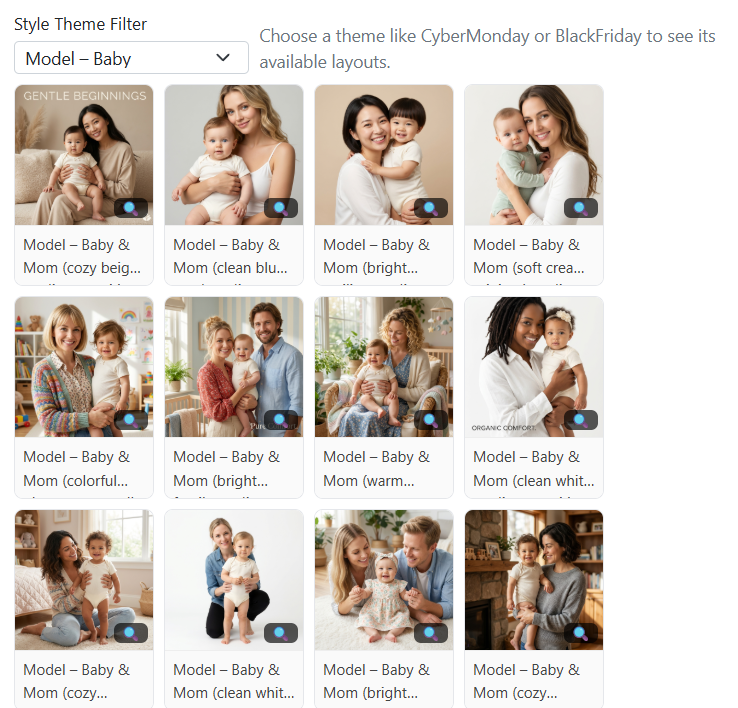
When using the Clone Images feature, you can select multiple reference images at once and generate several variations in a single run. This allows you to quickly produce multiple creative outputs without repeating the same steps for each image. If you choose to generate images using Style Themes , there is no need to manually select individual creative templates . Style Themes already bundle creative direction, lighting, mood, and composition, enabling you to multi-select styles and generate images in parallel instead of one by one. Additionally, new Baby Model Style Themes have been added. These themes are designed to create more diverse, natural, and lifestyle-oriented baby visuals , giving you a wider range of outputs from a single generation request. Key benefits: Multi-select images when using Clone mode Generate multiple outputs in one action Skip manual template selection when using Style Themes Faster workflow with parallel image generation More variety with newly added Baby Model Style Themes This streamlined approach helps you create richer creative sets with less manual effort and significantly improved efficiency .
Created: 12/18/2025 2:19:43 AM
Updated: 12/18/2025 2:19:43 AM
Expanded Image Style Themes (12 New Categories)
We’ve added 12 new image style theme categories to give you much greater flexibility when generating product visuals. These themes allow you to create images that feel seasonally relevant, context-aware, and lifestyle-driven , without changing the product itself. You can now generate images using different environmental and interior styles , helping your visuals better match use cases, marketing campaigns, and customer expectations. 🌿 Outdoor & Seasonal Themes These styles place your product in natural or seasonal environments , ideal for lifestyle marketing, seasonal promotions, and outdoor-focused listings. Outdoor Spring – Fresh, bright scenes with soft light and natural growth Outdoor Summer – Vibrant, warm environments with energetic outdoor vibes Outdoor Autumn – Cozy, earthy tones with fall foliage and textures Outdoor Winter – Clean, calm winter scenes with snow, frost, or cold light Outdoor Park – Open public spaces such as parks, walkways, and picnic areas Outdoor Garden – Private or decorative garden settings with plants and greenery These themes are perfect for showcasing products in real-world outdoor contexts while keeping the product as the main focal point. 🏠 Indoor & Home Themes These styles simulate everyday home environments , making your product feel practical, relatable, and ready for daily use. Home Living Room – Comfortable lifestyle scenes in shared living spaces Home Bedroom – Calm, personal settings with a relaxed atmosphere Home Kitchen – Clean, functional spaces associated with daily routines Home Bathroom – Minimal, hygienic environments with a fresh feel Home Laundry – Utility-focused spaces emphasizing cleanliness and order Home Nursery – Soft, gentle environments designed for baby-friendly products These themes help your product visually blend into realistic home settings , improving trust and emotional connection. ✨ What This Means for You You can create multiple image variations of the same product using different style themes The product remains unchanged, while the background, mood, and environment adapt Ideal for A/B testing , seasonal campaigns, lifestyle branding, and storefront optimization In short, these new themes let you generate images with different visual styles and contexts , making it easier to match your product visuals to any marketing scenario.

Created: 12/17/2025 12:38:34 AM
Updated: 12/17/2025 12:38:34 AM
Custom Image Output Size Support
Users can now enter their own custom image dimensions instead of being limited to preset sizes. In addition to the predefined options (such as banners, logos, and social formats), you can directly input the exact width and height you want for the final image output. This gives you full control over the image size to better match your specific use case—whether it’s for ads, landing pages, marketplaces, or custom layouts. Once a custom size is applied, it will be clearly displayed as the selected output size and used consistently during image generation. You can switch back to preset sizes or reset to the default at any time. Benefits: Greater flexibility beyond fixed presets Precise sizing for different platforms and design needs Faster workflow without resizing images afterward

Created: 12/13/2025 8:44:43 PM
Updated: 12/13/2025 8:44:43 PM
Improved User Experience for Image Generation & Ads Demo Exploration
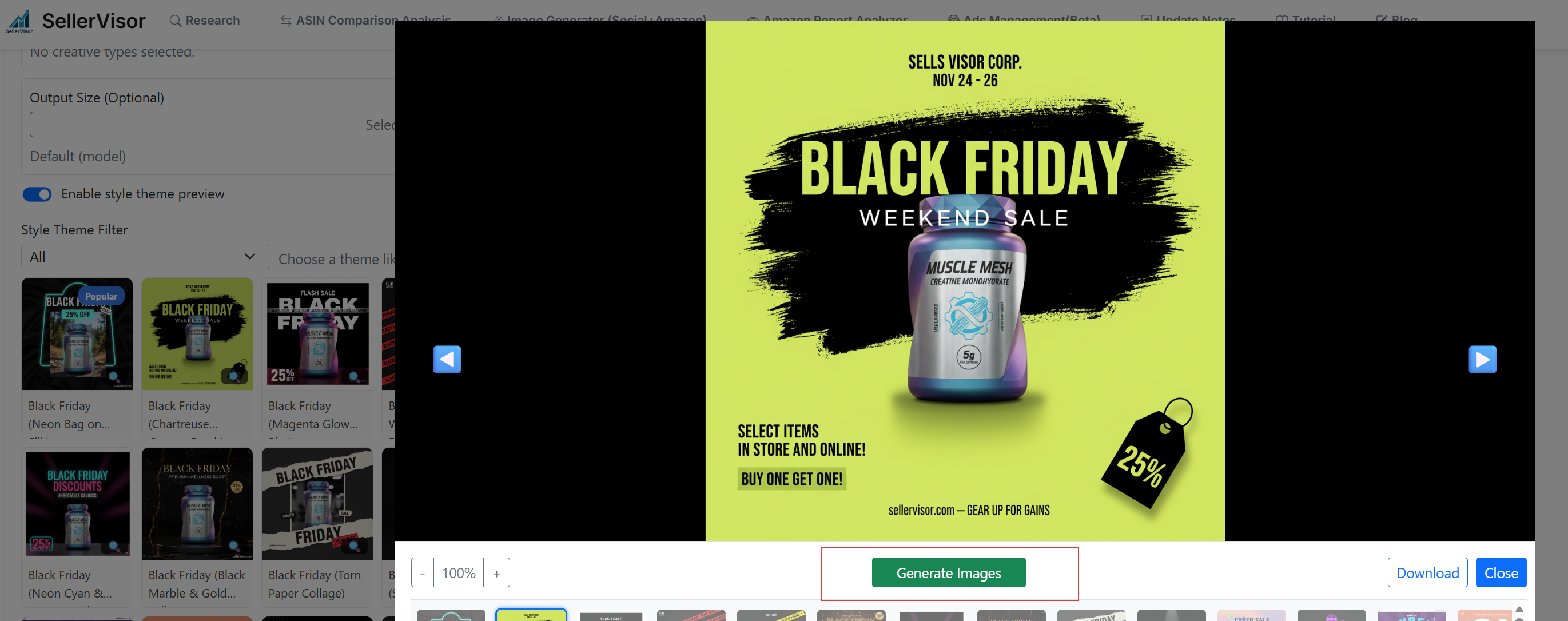
1. Generate Images Directly From the Zoom Modal The Zoom Modal now includes a “Generate Image” button, allowing you to create new images immediately while previewing any existing one. Instead of closing the modal and navigating back to the main interface, you can trigger new generation right from within the zoomed-in view. This makes the creative process faster, smoother, and more convenient—especially when testing multiple style variations or product scenes. 2. Ads Demo Pages Accessible from the Main Page We also added direct access to the Ads Demo experience from the main homepage. You can log in using the demo credentials and explore how campaign performance, keyword metrics, bid automation, and daily ad data are managed inside the system. Please note that some data shown in the demo environment is intentionally simulated (fake or placeholder values) to help you understand the structure, layout, and functionality without exposing real user data.
Created: 12/5/2025 4:15:13 AM
Updated: 12/5/2025 4:15:13 AM
Improved Zoom Modal Navigation & Thumbnail Preview In Image Generator
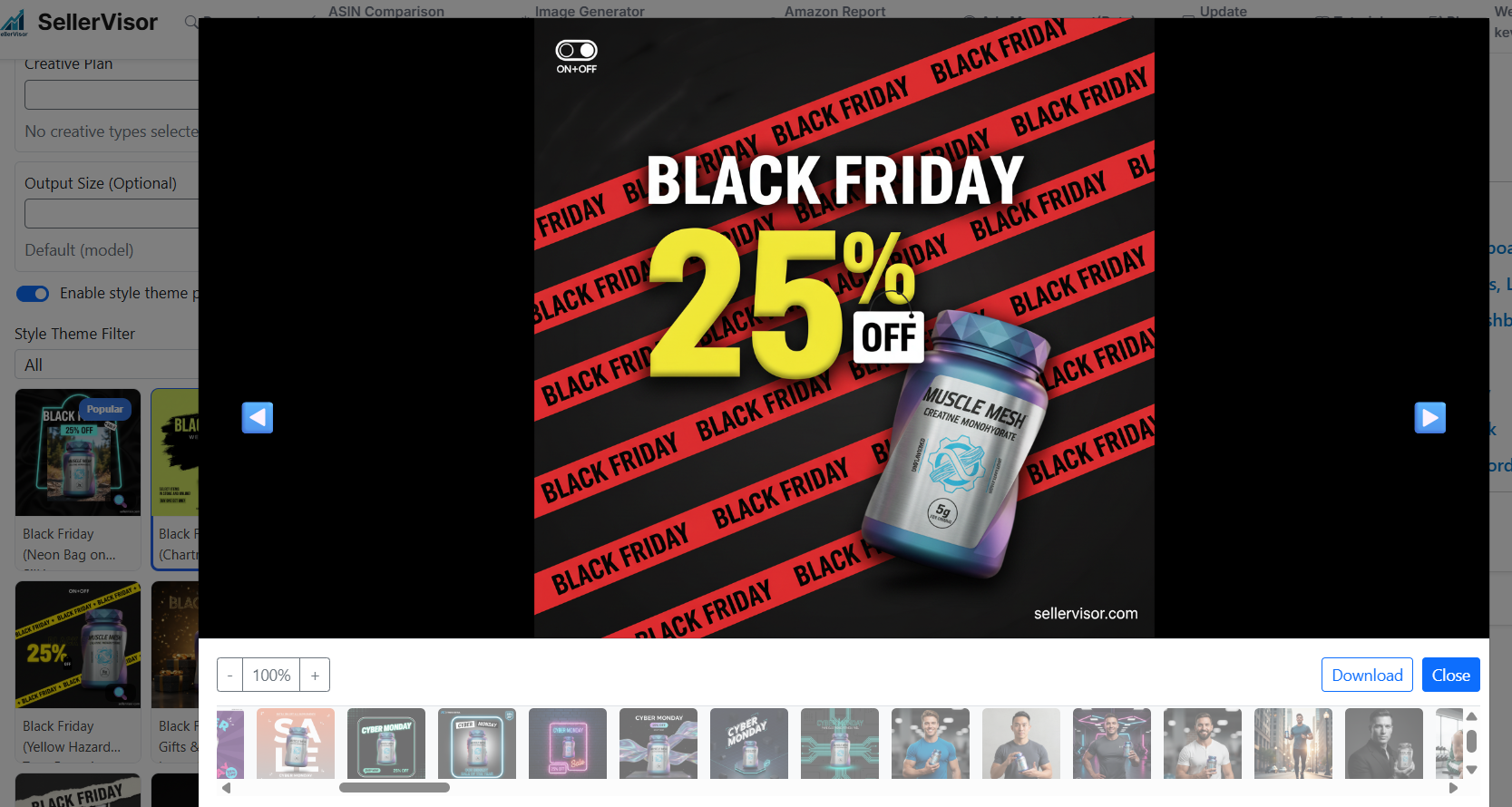
🖼️ Improved Zoom Modal Navigation & Thumbnail Preview The zoom experience has been upgraded to make browsing images much faster and more intuitive. Now, when you click the magnifier icon on any style card, the zoom modal opens immediately with all related images displayed as thumbnails at the bottom. This means: ✅ You no longer need to click each image one by one to load it. ✅ All images for that style are instantly available inside the modal. ✅ You can quickly jump to any image by selecting its thumbnail. In addition to thumbnails, navigation inside the modal is now much easier: Keyboard navigation: Use the left ← and right → arrow keys to move between images without touching the mouse. On-screen navigation buttons: Click the left or right arrow buttons inside the modal to cycle through the gallery. Overall, this update makes previewing and comparing style variations smoother, faster, and more user-friendly.
Created: 12/4/2025 3:30:07 AM
Updated: 12/4/2025 3:30:07 AM
Feature Update: Negative Keyword Management From Campaign & Keyword Bid Optimization & Dog-Themed Image Generation
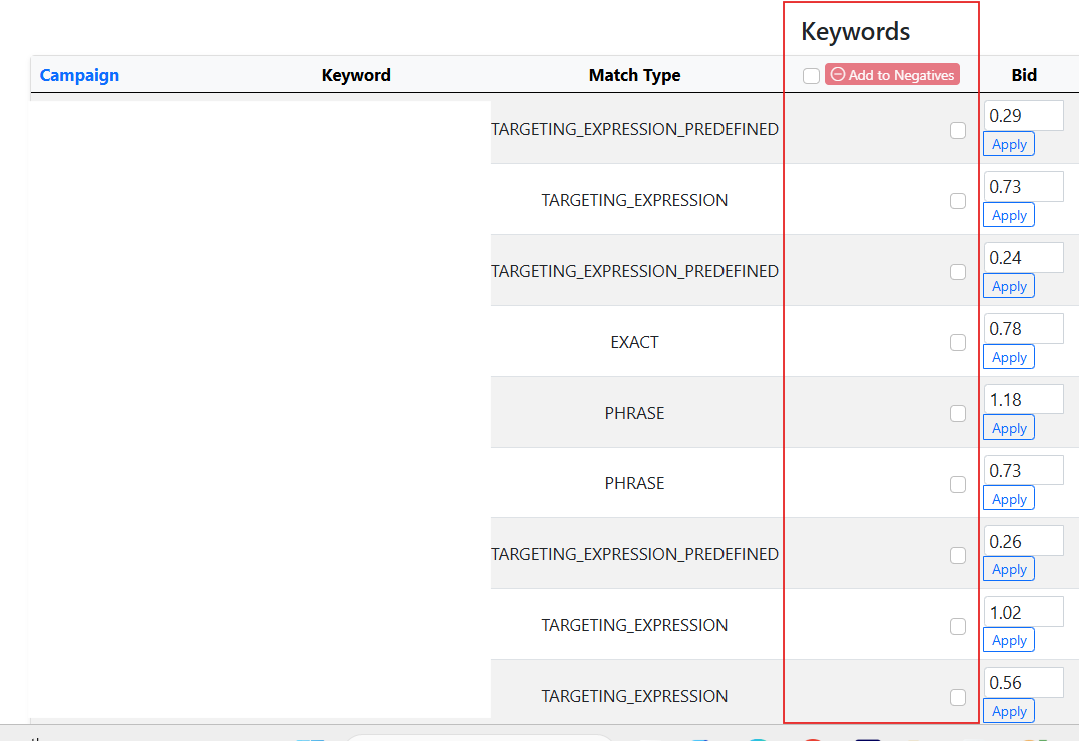
In-Page Negative Keyword Management (Campaign & Keyword Bid Optimization) You can now add negative keywords directly from the Campaign & Keyword Bid Optimization page without switching back and forth to Amazon Seller Central. This streamlines the workflow, allowing you to block irrelevant search terms instantly within the same interface for faster bid adjustments and better campaign control. New Dog-Themed Lifestyle Image Generation A new Dog Theme has been added to the image generator. You can now create lifestyle images featuring various dog breeds while automatically inserting your own product into the scene. This makes it easy to produce custom pet-focused marketing visuals in just one click.
Created: 12/3/2025 1:54:56 AM
Updated: 12/3/2025 1:54:56 AM
New: 4K Image Generation + Grid Issue Fix
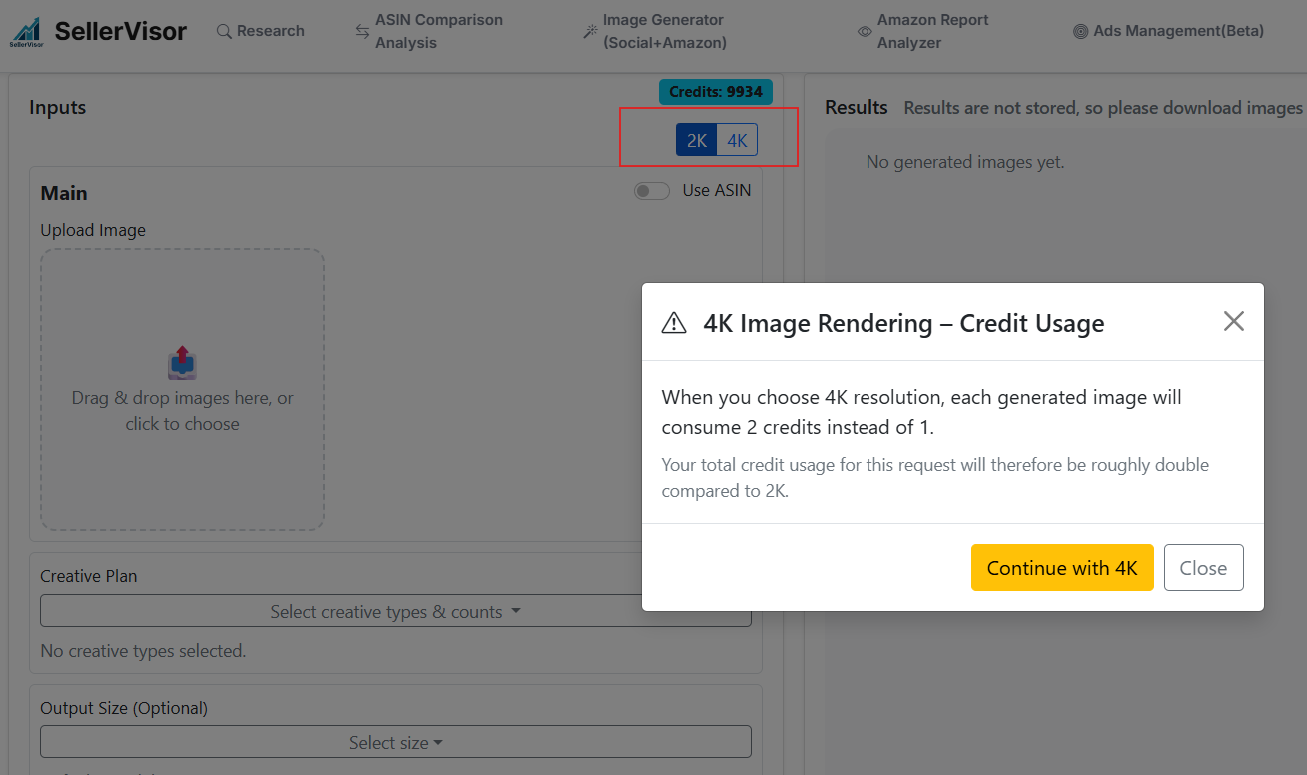
We’ve added a new 4K image generation option. This lets you create much sharper and higher-quality images, especially useful for: product close-ups Amazon A+ images marketing banners printing or cropping 💳 Credit Usage 2K = 1 credit 4K = 2 credits 4K uses more processing power, so it costs twice as much. 🛠 Grid Issue Fixed In the past, generating multiple images sometimes created a multiple- grid in one picture . This problem is now fully fixed — each image is generated separately and correctly.
Created: 12/1/2025 10:50:33 PM
Updated: 12/1/2025 10:50:33 PM
New Image Style Themes Added In Image Generator
1. Baby Model Themes Added We added new baby image themes with: Different styles (studio, lifestyle, cozy scenes) Multiple races and skin tones Various baby ages This makes it easier to create diverse baby-related images. 2. Supplement Style Themes Added We added new supplement themes featuring: Models of different races Different locations (car, kitchen, gym, home, etc.) Natural product replacement for user-uploaded supplement photos These themes help create more realistic supplement ads in many environments.
Created: 11/29/2025 11:00:55 PM
Updated: 11/29/2025 11:00:55 PM
On the Campaign & Keyword Bid Optimization page, you can now adjust keyword bids directly from SellerVisor.
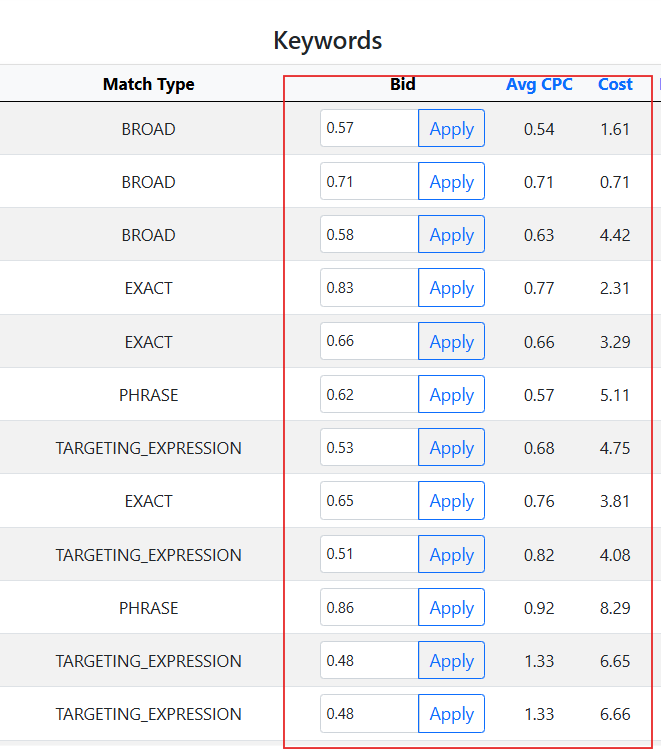
On the Campaign & Keyword Bid Optimization page, you can now adjust keyword bids directly from SellerVisor , and the changes are immediately applied to your Amazon Ads account —no need to switch back and forth between Seller Central or the Amazon Ads console. This streamlines bid management so you can optimize faster and with fewer clicks. We've also added two important analytics columns: Avg CPC (Average Cost-Per-Click): Shows how much you are actually paying per click on average. This helps you check whether your bid aligns with real auction performance. Cost: Displays the total spend for each keyword within the selected date range, making it easier to identify which keywords are consuming most of your budget. These additions give you a complete view of keyword performance at the same spot where you update bids, improving both efficiency and decision-making.
Created: 11/25/2025 2:57:53 AM
Updated: 11/25/2025 2:57:53 AM
Now the daily chart respects the selected campaign and keyword filters, so it only shows performance for the campaigns/keywords currently in view, also optimized the data loading for the Campaign & Keyword Bid Optimization page
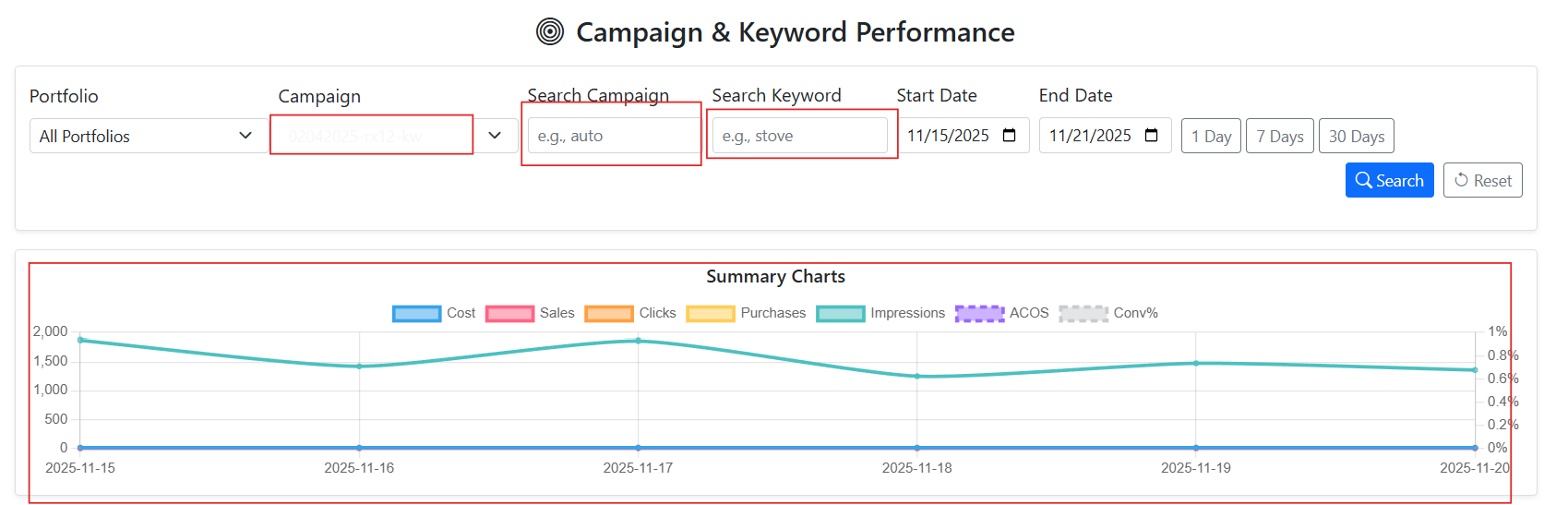
Now the daily chart respects the selected campaign and keyword filters, so it only shows performance for the campaigns/keywords currently in view. We also optimized the data loading for the Campaign & Keyword Bid Optimization page, so the initial load time is significantly reduced. This was done by pushing more aggregation work into the database, narrowing queries based on your filters, and avoiding unnecessary in-memory processing. As a result, both the table and the chart are now faster and stay perfectly in sync with the filters you choose.
Created: 11/22/2025 1:49:19 AM
Updated: 11/22/2025 1:49:19 AM
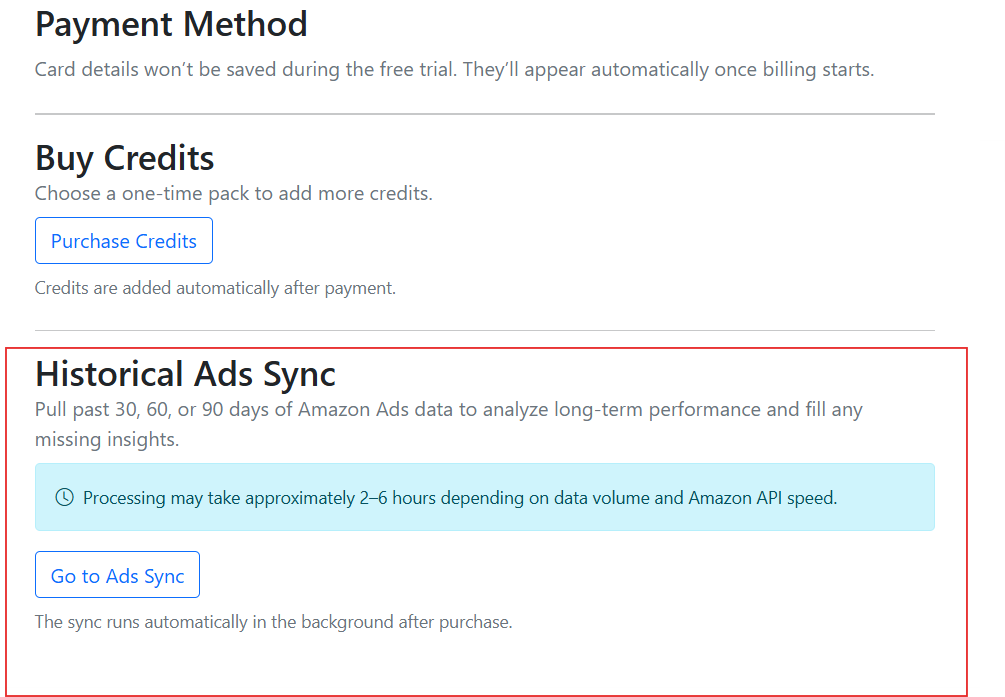
You can now purchase Top-Up plans directly from the Billing Dashboard to synchronize your historical Amazon Ads data for 30, 60, or 90 days.
🔹 How It Works Connect Your Amazon Ads API on the Settings Page Begin by connecting your Amazon Ads API through the Settings page. This initial connection imports only 1 day of Ads data to verify that your connection is working properly. Optional Top-Ups for Extended Sync Top-Ups are entirely optional — they’re available if you wish to retrieve additional historical Ads data beyond the default 1-day import. You can choose a 30-, 60-, or 90-day Top-Up, depending on how much historical performance data you’d like to analyze. Automatic Background Sync Once purchased, the Top-Up sync begins automatically in the background. Depending on Amazon’s API speed and data volume, the process usually takes 2 to 6 hours to complete. Progress and Availability Your Ads data will gradually appear in your reports and dashboards as it’s processed.
Created: 11/11/2025 8:40:34 PM
Updated: 11/11/2025 8:40:34 PM
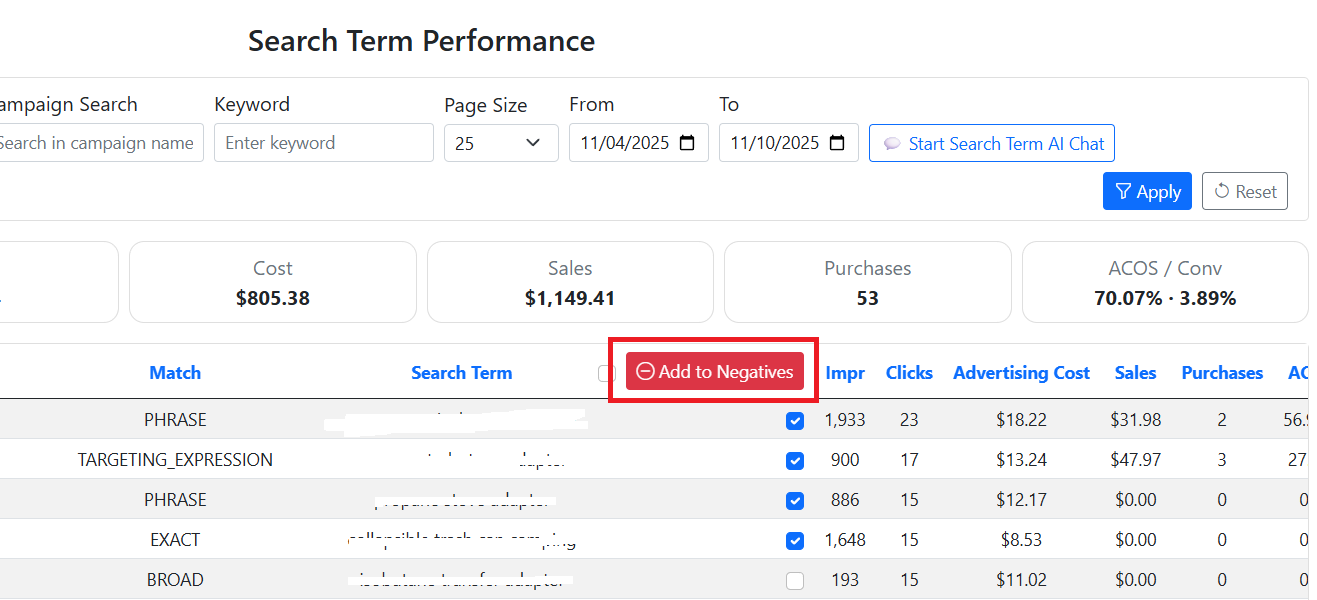
You can now add negative keywords directly from your search term data, making it easier to control unwanted ad targeting and improve campaign efficiency.
Key Capabilities Campaign / Ad Group Level Control Apply negative keywords at either the campaign or ad group level. Campaign-level negatives block unwanted search terms across all ad groups. Ad group-level negatives give you fine-grained control for specific ad sets. Phrase and Exact Match Support Choose between phrase or exact match types when adding negative keywords. Phrase match blocks any search containing the phrase. Exact match blocks only that exact search term. Product- or Keyword-Level Selection Add exclusions based on either product ASINs (to block specific items) or keywords (to refine your keyword targeting). Create & Update Actions Create → Used to add new negative keywords directly from search term insights. This helps you quickly stop irrelevant searches that waste ad budget. Update → Lets you change the status of existing negative keywords — for example, marking them as Archived (to temporarily disable) or Enabled (to re-activate). Centralized Review Page After creation or updates, you can easily review, edit, or delete these entries anytime on the Negative Keywords page. This provides a full audit trail and keeps your targeting strategy organized.
Created: 11/11/2025 8:28:39 PM
Updated: 11/11/2025 8:28:39 PM
New Feature Release: Ads Automation & Reporting Dashboard (Beta)
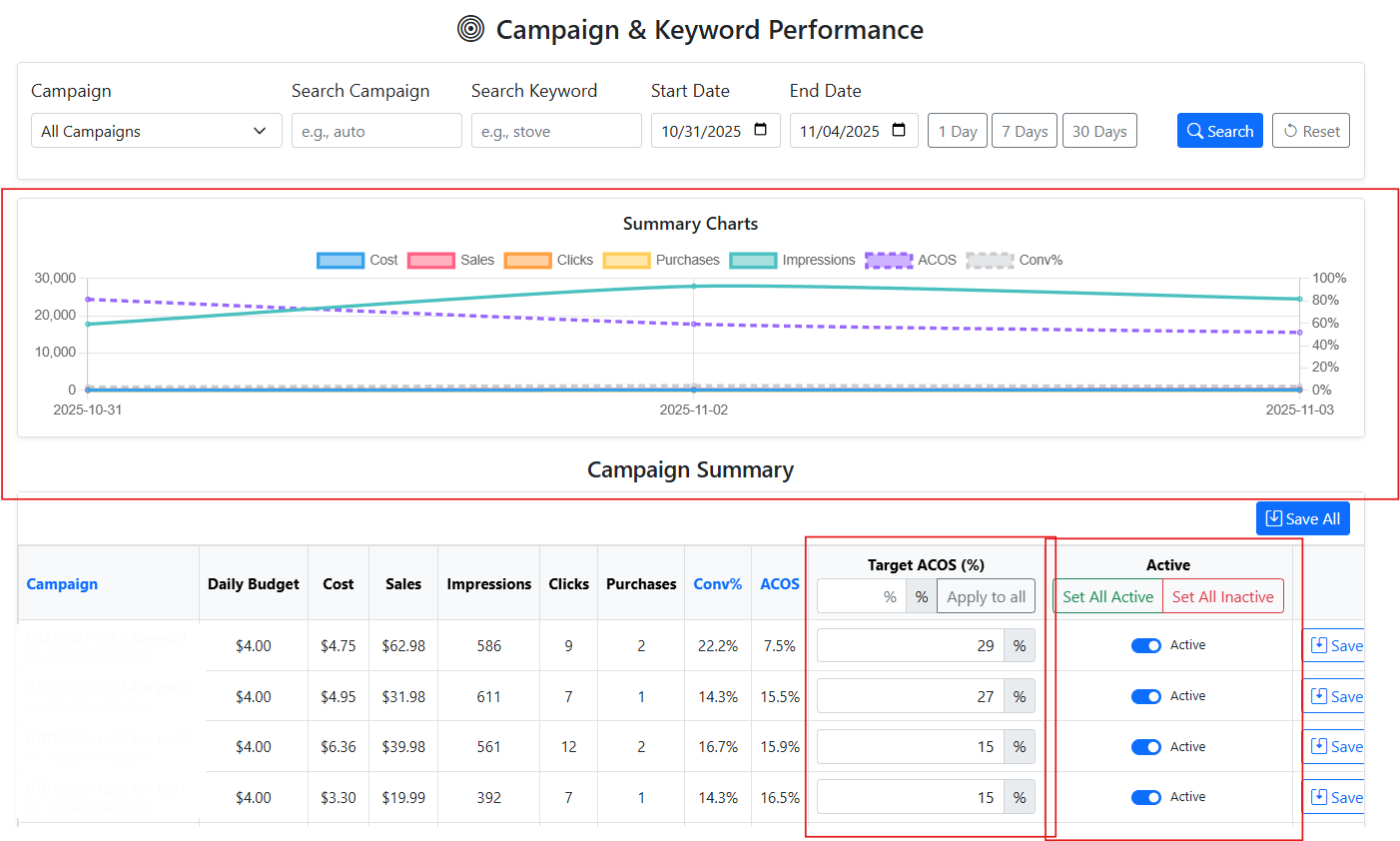
We’ve introduced new tools to help you monitor ad performance more intelligently and prepare for future automation features. 1. Campaign Keyword & Automation (Bidding Update Coming Soon) You can now set a target ACOS for each campaign to prepare for upcoming automated bidding. Daily ad performance charts make it easy to track ACOS, ROAS, spend, clicks, and sales trends. For each campaign, you can: Enable or disable automation mode — this currently monitors campaigns and prepares them for automatic adjustments. Set target ACOS , which will be used for automatic bid adjustments in a future update. 2. Search Term Performance Insights View detailed search term metrics filtered by date range . Analyze impressions, clicks, orders, sales, spend, conversion rate, ACOS, and more. A summary helps you quickly identify: High-performing search terms worth increasing bids or adding as keywords Low-performing or wasteful search terms that may need to be negated 3. Ads Automation Performance Overview A dedicated dashboard shows how your campaigns perform under automation mode . You can check: ACOS trends compared to your target Whether campaigns are over or under target thresholds For a detailed walkthrough of the Ads Management features, please visit the following guide: https://www.sellervisor.com/Blog/Details/sellervisors-ads-management-beta-feature-tutorial
Created: 11/5/2025 3:07:28 AM
Updated: 11/5/2025 3:07:28 AM
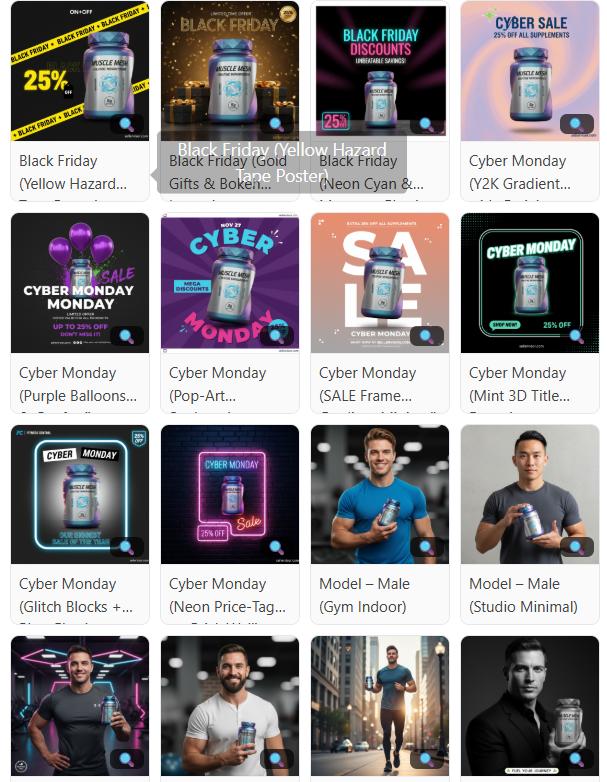
Added badges for popular style templates within each filter category, based on the latest one-week usage data.
Styles are now automatically marked as “Best,” “Popular,” or “Trending” , helping you quickly identify the most used and high-performing templates. Additionally, we’ve introduced an entirely new “Family” style theme , expanding creative options for lifestyle and product scenes involving families. You’ll also find new styles added across several categories , including Couple , Cyber Monday , and Black Friday , bringing more seasonal and promotional variety to your creative library.

Created: 10/16/2025 1:09:05 AM
Updated: 10/16/2025 1:09:05 AM
The new Style Theme system makes creative generation faster and easier.
You no longer need to manually type prompts to generate detailed images! What’s new: Theme Filters – Easily browse and select from predefined creative themes such as Cyber Monday , Black Friday , Model – Men , Model – Women , Model – Couple , and Environment . More professionally designed templates will be added soon to expand your creative options. Zoomable Previews – Hover or click on a thumbnail to zoom in and preview each theme in full detail before generating your image. This helps you visualize the final look and choose the perfect style. Discount Overlay – You can now add a discount percentage (e.g., “30% OFF”) directly onto your generated images for promotional campaigns and sale banners. Website Branding – Add your website URL or brand name to appear on the generated image automatically, helping reinforce your brand identity.
Created: 10/15/2025 2:39:15 AM
Updated: 10/15/2025 2:39:15 AM
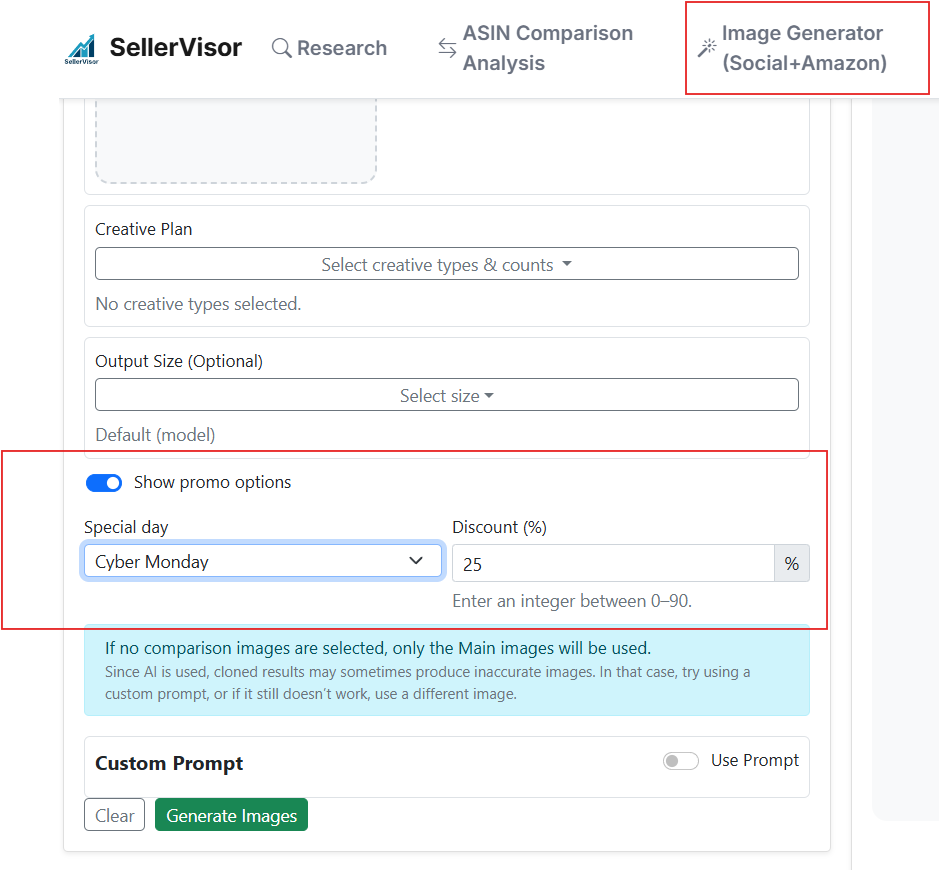
09/25/2025 Update Notes
New Promotion Image Option Added! You can now generate special holiday-themed sale images with built-in percentage discounts. Simply toggle the promotion button, and a menu will appear where you can select the holiday type and input your discount (e.g., 15%, 25%). Within seconds, the system creates ready-to-use promotional visuals —perfect for Christmas, Prime Day, Black Friday, or any seasonal event. These images can be tailored as banners, hero graphics, or social media ads, helping you launch eye-catching campaigns without extra design work.
Created: 9/26/2025 2:57:24 AM
Updated: 9/26/2025 2:57:24 AM
9/24/2025 Update Notes
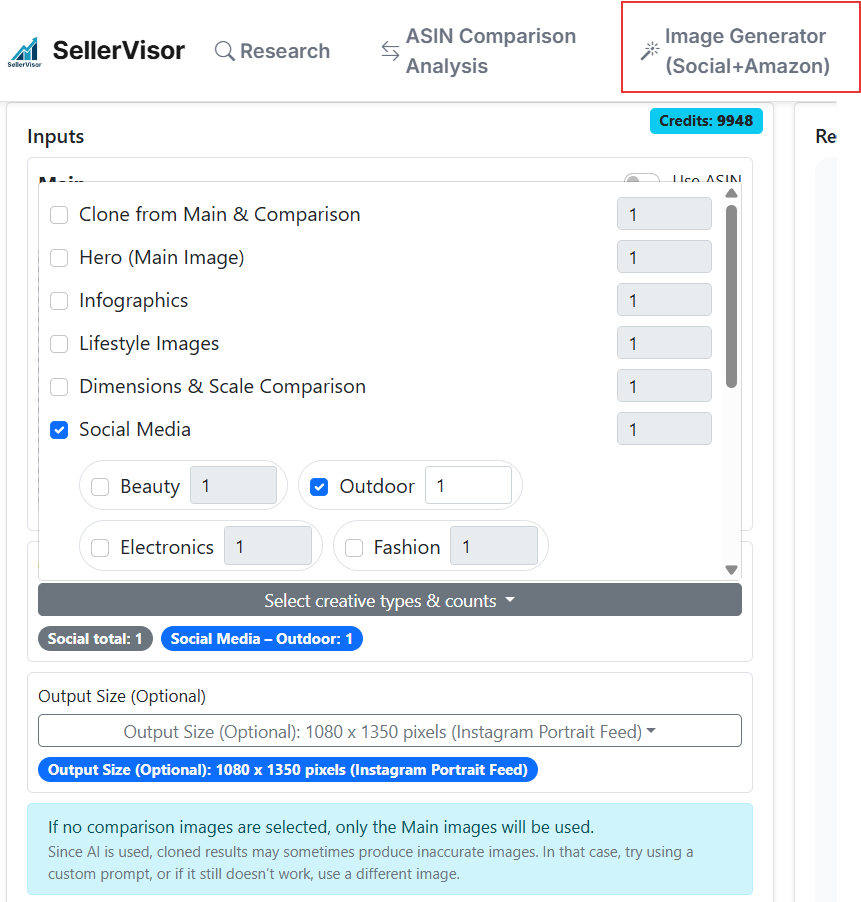
Social Media Image Generation Feature Added You can now easily design images tailored for your social media feeds by choosing from predefined size options (e.g., Instagram square, portrait, story). This allows you to create posts that look professional and fit perfectly on each platform. In addition, you can also select a content category that matches your business or product niche, helping the generator adapt the style and focus of the output for better relevance. To reflect these new capabilities, the page name has been updated from “Image Generator” to “Image Generator (Social + Amazon)” , highlighting that it now supports both social media content and Amazon listing images in one place.
Created: 9/25/2025 2:06:43 AM
Updated: 9/25/2025 2:06:43 AM
09/23/2025 Update Notes
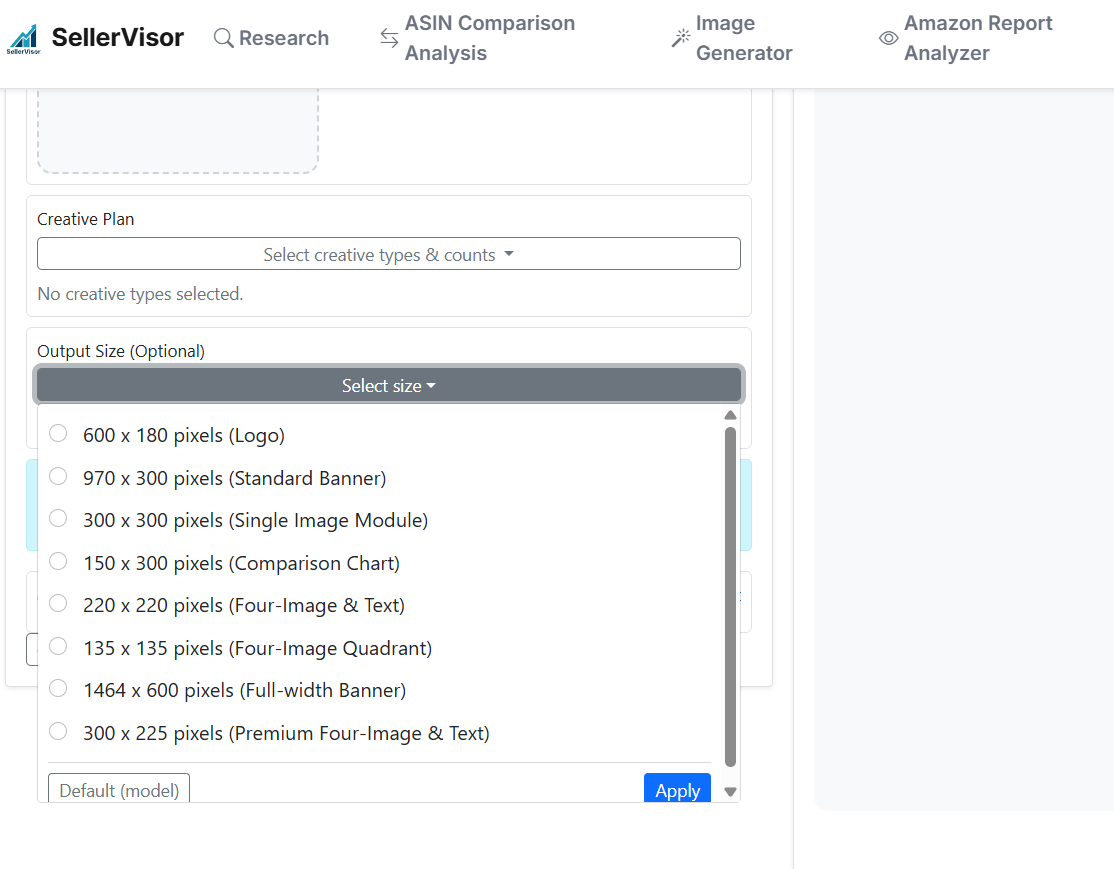
Added Aspect Ratio for Image Generation We’ve introduced support for custom aspect ratios to give you more control over how images are rendered. This setting is optional—if you don’t choose one, the system will automatically generate images at the default size of 1024 × 1024 (square). By specifying a ratio (for example, 16:9 , 3:2 , or 970×300 ), you can tailor the output for different use cases such as banners, product logos, lifestyle shots, or comparison graphics. This makes it easier to design a wide variety of A+ content layouts that better fit your creative and marketing needs. In short, you can now: Stick with the default 1024×1024 for a balanced square output. Select a custom aspect ratio to match the style or format you want. Leverage these variations to enrich your A+ content strategy and stand out visually. Enjoy experimenting with this new flexibility in your creative workflow! 🎉
Created: 9/24/2025 1:17:55 AM
Updated: 9/24/2025 1:17:55 AM
09/22/2025 Update Notes
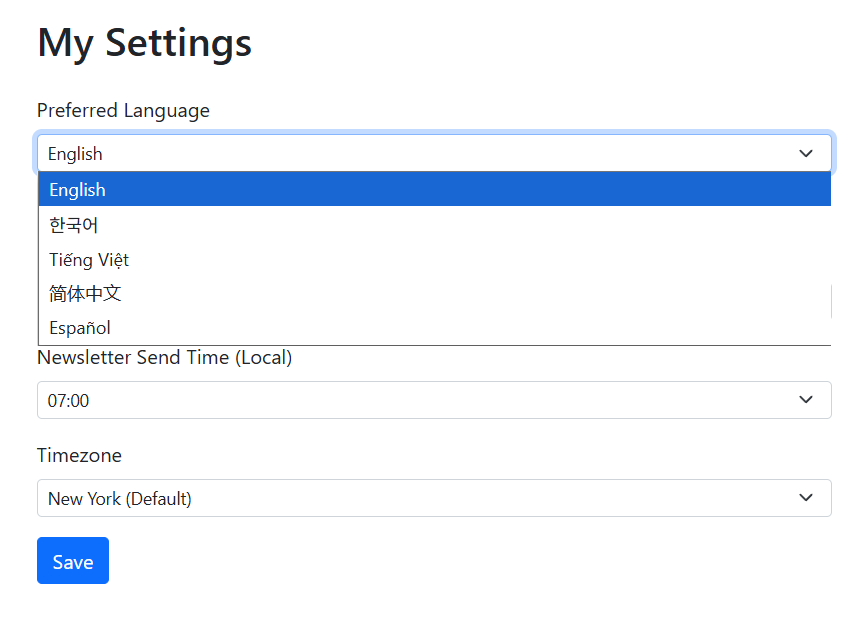
Simplified Chinese and Spanish have been added in the account settings, and all newsletters and email notifications are automatically delivered in the preferred language you select there — ensuring that whether you choose English, 한국어, Tiếng Việt, 简体中文, or Español, you consistently receive communication in your chosen language.
Created: 9/23/2025 2:17:36 AM
Updated: 9/23/2025 2:17:36 AM
09/07/2025 Update Notes
Update notes are now available in each user’s preferred language.
Created: 9/7/2025 6:39:54 PM
Updated: 9/7/2025 6:39:54 PM
9/5/2025 Update Notes
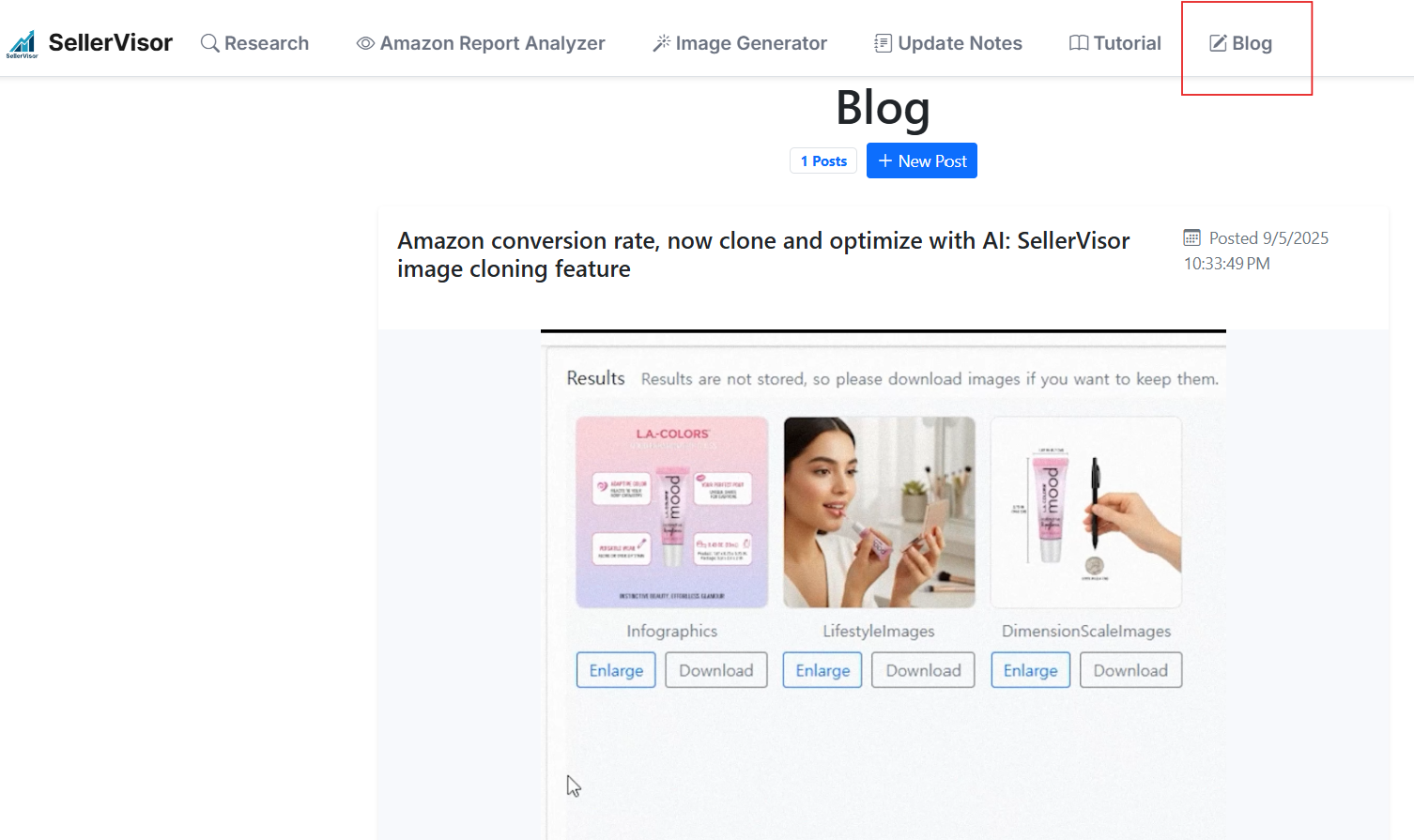
Our blog page has been refreshed! 🎉 Here you’ll find in-depth insights, the latest industry news, practical tips, and real stories to help you grow and stay ahead. Explore expert perspectives, product updates, and community highlights — all in one place. 🔎 You can find this page right after logging in through the top menu , or directly from the main landing page .
Created: 9/6/2025 2:00:34 AM
Updated: 9/7/2025 6:38:08 PM
9/3/2025 Update Notes
1. General Image Generation You can start in two ways: Enter an ASIN → the system automatically fetches all listing images and stores detailed product information in the backend. That data is then used to generate high-quality images such as hero shots, infographics, lifestyle photos, and size comparisons . Manually upload your own image → upload any product photo directly and use it as the source for generating new variations. 2. Clone Image Feature Easily clone images from other ASINs , replacing the subject while keeping the original background and scene intact. Perfect for quick, professional-looking variations. 3. Credit Information 1 image = 1 credit Free-trial and paid subscribers receive 20 credits 20 new credits are added automatically each month as long as your subscription remains active Yearly subscribers receive 480 credits upfront (double the monthly equivalent) Need more credits? Go to the Billing Dashboard to purchase more

Created: 9/4/2025 12:07:08 AM
Updated: 9/7/2025 6:37:02 PM
8/29/2025 Update Notes
1. Button labels have been updated for clarity, and error messages now clearly explain the cause. 2. Added Amazon Report Analyzer to the Tutorial section with two walkthrough videos and expanded content.

Created: 8/29/2025 2:35:07 PM
Updated: 9/7/2025 6:36:35 PM
8/26/2025 Update Notes
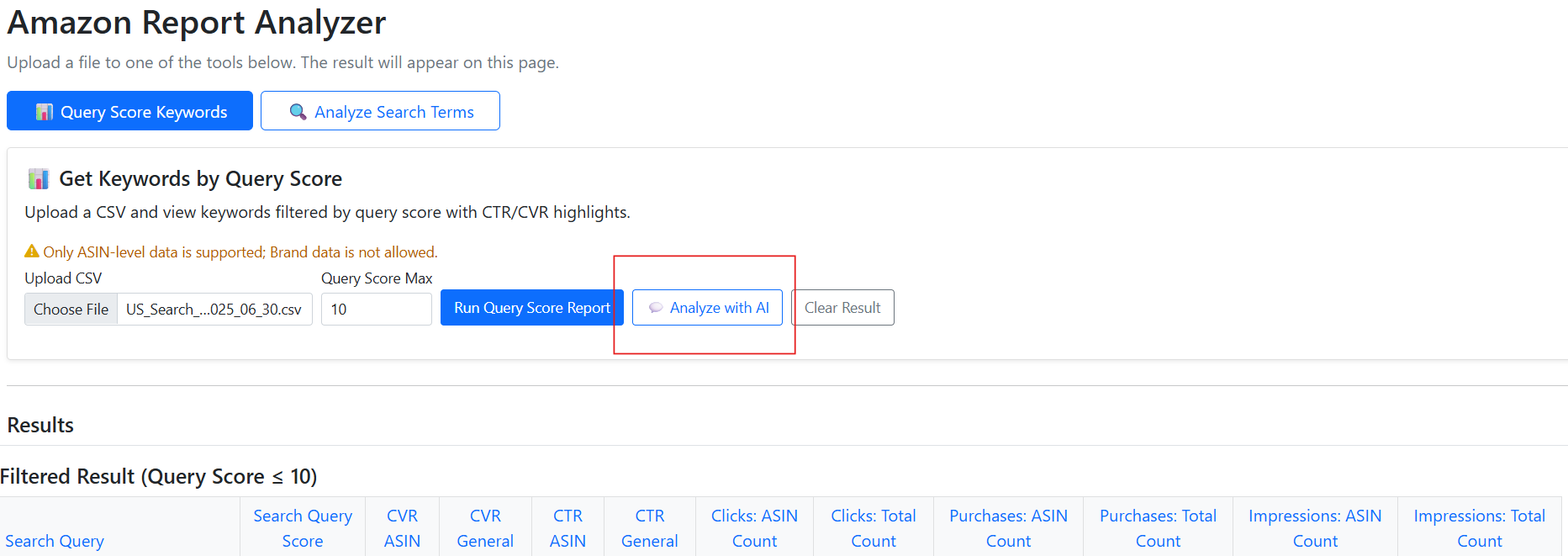
1. Added the Search Query Performance Analyzer – A new tool that lets you analyze Amazon Search Query Performance (SQP) data directly, now paired with an AI chatbot to help interpret trends, identify opportunities, and explain keyword-level insights based on organic search and shopper behavior metrics. 2. Added the Search Term Report Analyzer – A separate tool for analyzing Amazon Search Term Reports, equipped with an AI chatbot that reviews your ad campaign search term data, highlights high- and low-performing keywords, and suggests actionable optimizations.
Created: 8/27/2025 2:44:04 AM
Updated: 9/7/2025 6:36:14 PM
08/24/2025 Update Notes
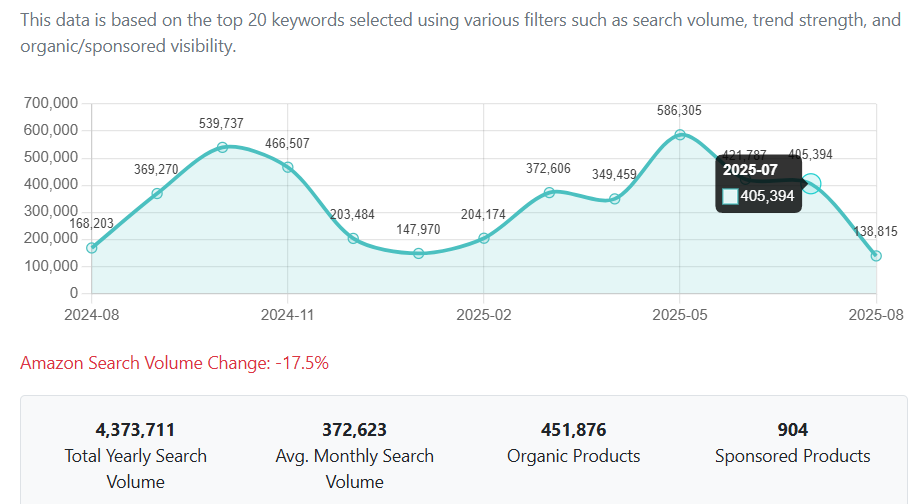
1. Enhanced Search Volume charts – expanded the hover area for easier mouse-over and resolved label cut-off issues. 2. Adjusted spacing for the History label to improve visual alignment. 3. Renamed terms : changed “SB” to “SH” throughout the interface. 4. Added a back-to-top button on the Tutorial page for easier navigation. 5. Updated page title : “Settings” renamed to “Settings (Language, Newsletter)” for clearer context.
Created: 8/24/2025 6:28:10 PM
Updated: 9/7/2025 6:35:30 PM
8/22/2025 Update Notes
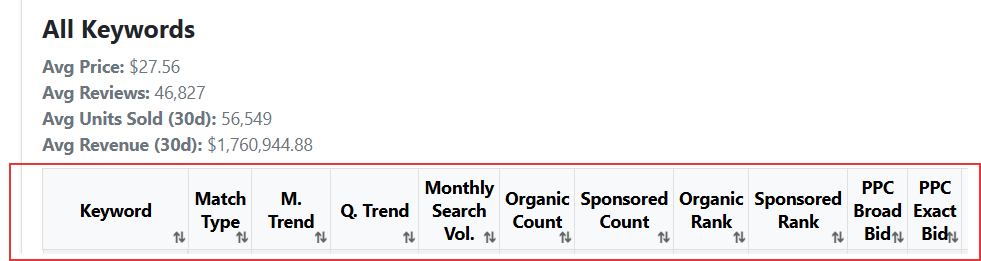
1. Implemented sortable functionality for table headers 2. Fixed Korean text rendering issues during PDF extraction from report 3. Improved chatbot window resizing and dragging behavior 4. Enabled moving and resizing for the Search Volume Chart modal 5. Reduced report generation time
Created: 8/22/2025 8:55:01 PM
Updated: 9/7/2025 6:35:08 PM
8/21/2025 Update Notes
1. Settings icon added next to the user ID. 2. ASIN updates: product image with an Amazon link; selling price and rank fields added (ranks refresh hourly). Charts now display ranks, and data snapshots are recorded with today’s date. 3. “Forgot Password” option added on the login page.

Created: 8/22/2025 12:02:05 AM
Updated: 9/7/2025 6:34:46 PM
8/20/2025 Update Notes
1. Added Main ASIN / Keyword label with link and copy functionality 2. Enforced single-browser login (a user can only be signed in on one browser at a time)
Created: 8/20/2025 11:18:48 PM
Updated: 9/7/2025 6:34:31 PM
8/19/2025 Update Notes
The chatbot’s monthly sales estimate summary has been enhanced with weekday sales breakdowns.
Created: 8/20/2025 2:34:37 AM
Updated: 9/7/2025 6:34:09 PM
8/18/2025 Update Notes
Research -> Sales Estimates Charts Added

Created: 8/20/2025 2:27:52 AM
Updated: 9/7/2025 6:33:53 PM