
Search Query Performance

Turn Amazon SQP reports into clear, actionable insights

Upload ASIN-level Search Query Performance (SQP) CSV files and convert them into a simple, visual insight workflow.
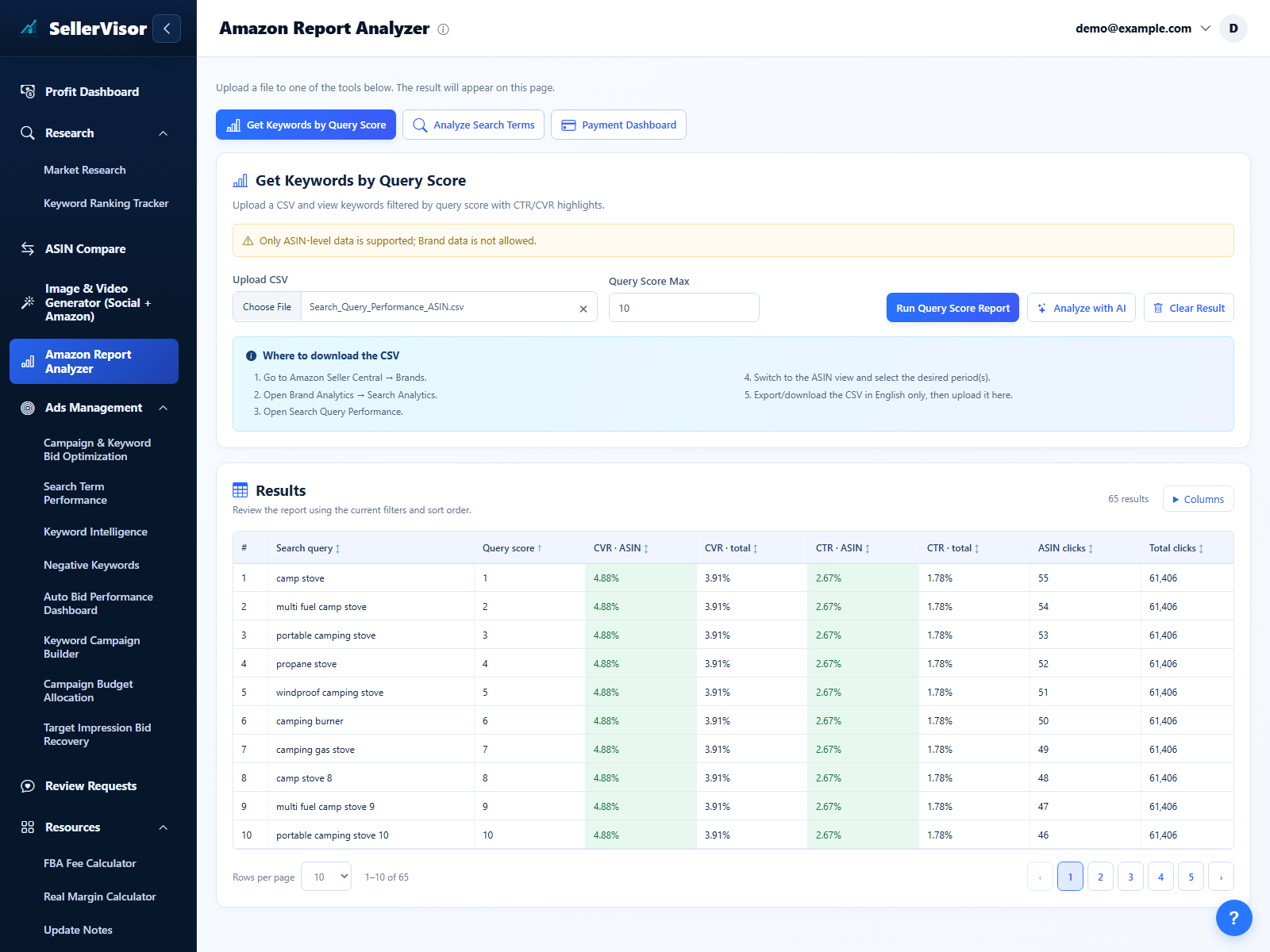
Use a maximum query score to cut noise, focus on high-impact phrases, and see which queries actually drive clicks and sales.
Combine CTR/CVR highlights with an AI chatbot so you can quickly decide what to scale, fix, or pause.

What this module helps you do
  • Import ASIN-level SQP CSVs in a guided flow
  • Apply a maximum query score to remove low-value noise
  • Highlight strong and weak queries using CTR and CVR
  • Detect wasted search terms that burn spend without revenue
  • Send data to an AI chatbot for fast, conversational analysis
Upload your SQP file and set the filters

Upload ASIN-level SQP and preview the query table

  • Upload the official SQP CSV exported at ASIN level so every query is tied to a specific product; brand-level exports are intentionally not supported to keep the view focused.
  • Set a maximum Query Score before running the analysis to hide low-priority long-tail entries and prioritize relevant terms.
  • See an instant table preview of queries, impressions, clicks, and conversions so you know your file was loaded correctly.
Upload ASIN-level SQP and preview the query table
Use the AI chatbot to interpret patterns and next steps
Analyze SQP data with an AI assistant

Use the AI chatbot to interpret patterns and next steps

  • Send selected queries and metrics into the built-in AI chatbot to summarize patterns, outliers, and missed opportunities.
  • Ask anything—such as which queries to bid up, add as negatives, or include in titles and bullets—instead of manually scanning hundreds of rows.
  • Turn the chat into a living analysis log that you can revisit after each new SQP upload to compare how your search terms evolved.
From raw report to optimization checklist

Follow a clear workflow from SQP file to action plan

  • Start with the SQP file, filter with Query Score Max, then read CTR/CVR highlights to understand where performance is strongest or weakest.
  • Use the infographic view as a simple map: identify growth queries, protection queries, and waste queries for each ASIN.
  • Export a prioritized checklist for bidding changes, listing updates, and new keyword tests so you always leave the report with concrete next steps.
SQP โ†’ Insights โ†’ Action plan
1
Search Query Performance
Upload the official SQP CSV exported at ASIN level so every query is tied to a specific product; brand-level exports are intentionally not supported to keep the view focused.
2
Apply a maximum query score to remove low-value noise
Set a maximum Query Score before running the analysis to hide low-priority long-tail entries and prioritize relevant terms.
3
Highlight strong and weak queries using CTR and CVR
Send selected queries and metrics into the built-in AI chatbot to summarize patterns, outliers, and missed opportunities.
4
Send data to an AI chatbot for fast, conversational analysis
Export a prioritized checklist for bidding changes, listing updates, and new keyword tests so you always leave the report with concrete next steps.