Are you asking the same question every Monday?
What improved last week? Why did net profit decrease? Should I pull the 4-week sales table again? The questions sellers repeat every week are generally similar. The problem is not the questions themselves, but that a person has to re-enter the same questions every time.
7 routines are already available in VISO's My routines
When you open the My routines tab in the VISO panel, 7 ready-to-use routines appear. Each routine has "what to analyze and what to receive" predefined, so there's no need to write new questions.
- Today's checklist (Daily) — Priorities for checks and actions to confirm today
- Weekly performance briefing (Weekly) — Improvements compared to last week and follow-up on recorded decisions
- Sales diagnosis (Weekly · Monthly) — Explaining sales changes with demand, advertising, and sessions
- Variation scorecard (Weekly) — Comparison of 4-week performance variations
- Advertising optimization (Weekly) — Reviewing campaigns, ACOS, and placements to prioritize
- SQP insights (Weekly) — Search query demand changes and purchase opportunities
- Growth action plan (Monthly) — Action priorities to increase sales
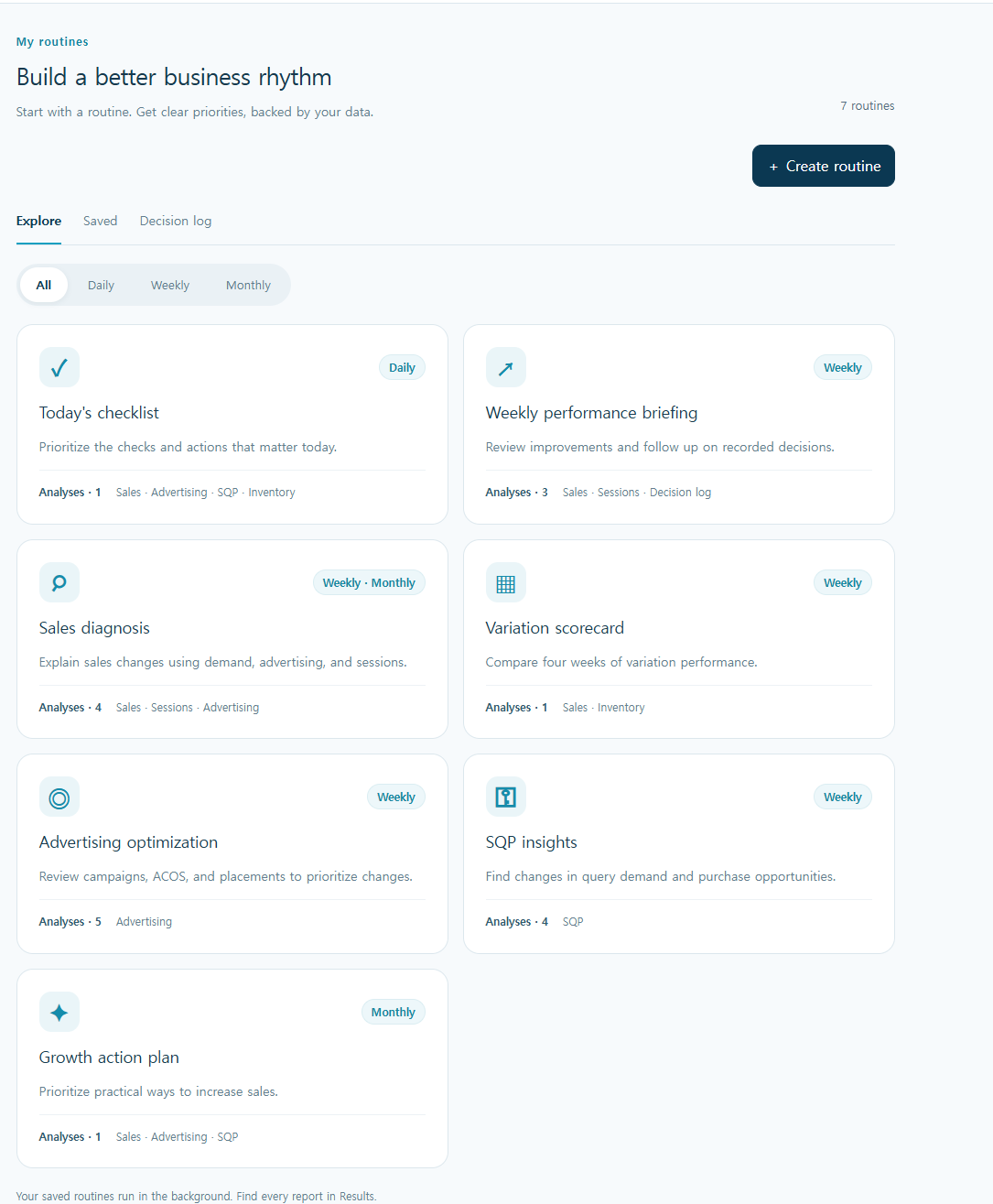
The number of analyses included and data sources differ for each routine. For example, the Weekly performance briefing consists of 3 analyses (Sales, Sessions, Decision log), and the output is set as "Three key changes + 4-week sales table".
Schedule once: Day, Time, Time zone, Report language
Open a routine card and turn on Automatic execution to open the Schedule settings. You can select the frequency as Daily / Weekly / Monthly / Custom, choose the time and time zone from US Eastern, Korea, US West, and specify the day of the week and report language (English, Korean, Vietnamese, Spanish, Simplified Chinese). US time zones automatically reflect daylight saving time.
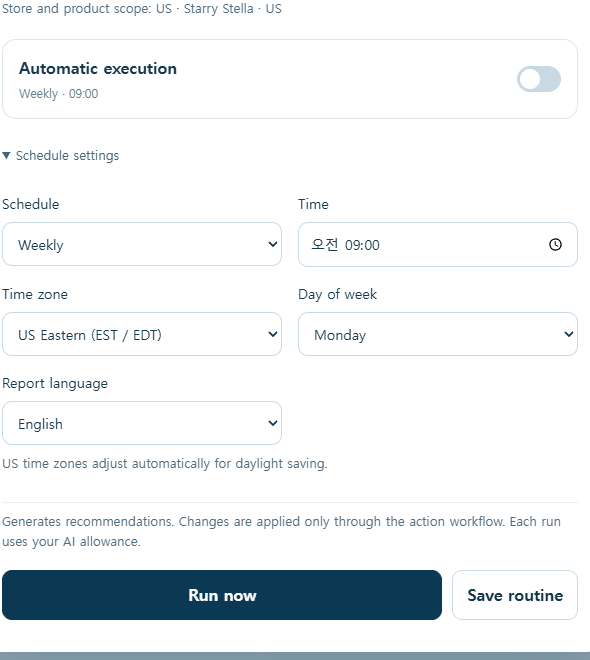
As stated on the settings screen, routines generate recommendations, and actual changes are applied only through action workflows. Since AI credits are consumed for each execution, it's advisable to check your credit balance when setting the frequency.
Results accumulate in the Results tab
Once saved, routines run in the background, and results accumulate as 'Completed' in the Results tab. You can browse with 'All', 'Unread', 'Needs confirmation' filters, and failed executions can be retried. In other words, routines leave behind not "notifications" but a stack of readable reports.
The actual briefing looks like this
This is the result of running a Weekly performance briefing on a real account (US demo store, executed on November 15, 2026). VISO provides "Three key changes" and the "Latest four weeks" table together.
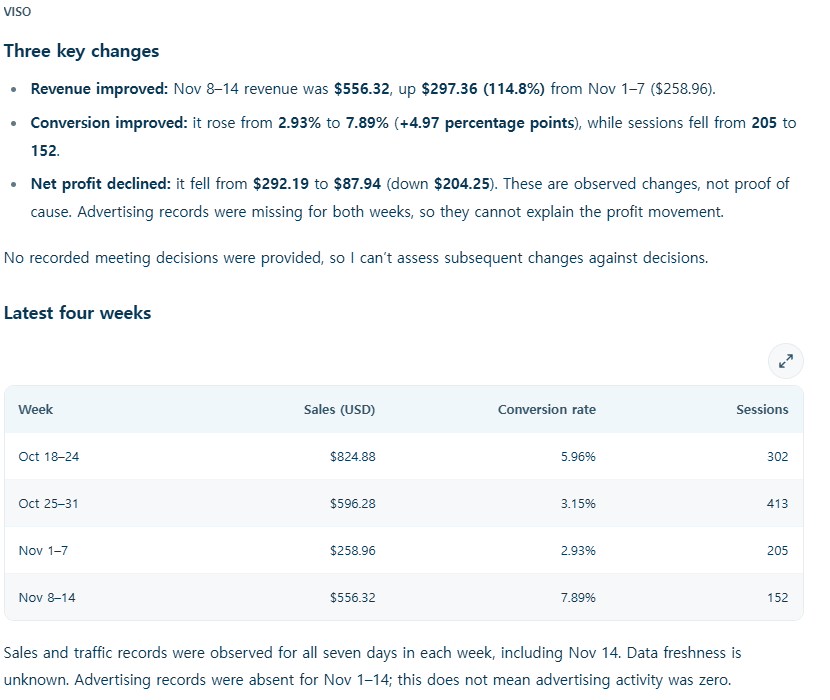
In this execution, sales increased from $258.96 to $556.32 (an increase of +114.8% compared to the previous week), and the conversion rate rose from 2.93% to 7.89%, but sessions decreased from 205 to 152, and net profit fell from $292.19 to $87.94. VISO also notes limitations such as "These are observed changes and do not prove causation," and "Advertising records are missing for both weeks, so changes in profit cannot be explained." This means it's not a report that just throws numbers at you, but rather a report that adds clues to prevent misinterpretation by the reader.
3 tips for long-term routine use
1) Fill out the Decision log. If you record the decisions made in meetings in the Decision log tab, the Weekly briefing will cite the three most recent decisions and point out what has changed since then. If you don't leave decisions, the briefing will honestly state, "No recorded decisions."
2) Set frequency and credits together. Daily routines consume one credit per day. If a metric doesn't need to be checked daily, it's safer to set it to Weekly and only add Advertising optimization during periods of intensive ad management.
3) Add them one by one. Start with just Today's checklist or Weekly performance briefing, and once you get into the habit of reading, adding Sales diagnosis and SQP insights can help avoid reports accumulating unread.
Frequently Asked Questions
Q. What is the difference between chat and routines? Chat answers questions asked on the spot. Routines repeat a set of the same questions at a defined frequency, accumulating results. It's most natural to try running once with 'Run now' from 'Recommended routines' on the right side of the chat tab, and if you like it, schedule it.
Q. Do routines automatically change ads? No. Routines create analyses and recommendations, and actual changes are applied only through action workflows. You can check which changes have been applied in the action history and revert them.
Q. Can I set a different report language for each routine? Yes. Report language is a per-routine setting. It's possible to receive reports in Korean only, separate from the screen UI language.
Q. Which routine should I start with? If the goal is a weekly performance review, we recommend Weekly performance briefing; if you need daily morning priorities, Today's checklist.
Get Started Now
VISO is an AI agent within SellerVisor. When you connect Amazon sales, advertising, and keyword data, routines generate reports based on that data. There is a 14-day free trial, and until November 30, 2026, a 50% discount for the first month on monthly plans (VISO50) and a 30% discount for the first year on annual plans (VISO30) coupons are applicable.
If you schedule it once today, next Monday morning you'll open a report instead of asking questions.