SellerVisor's advertising automation case where ACOS decreased from 298.7% to 46.9%

发布时间 2026/2/8 23:55:03


Since the last RPC (Revenue Per Click) based Ads Automation beta deployment, the most common feedback received was “While performance can improve, in some accounts, bids rise too aggressively and ad costs become concerning.”

In reality, from Placement (Top of Search, etc.) settings, aggressive bid increases could lead to excessive spending or create a “cost burden zone.” Therefore, SellerVisor actually deployed the promised three safety mechanisms + additional safety features + UI improvements for history, and the results are directly reflected in the dashboard below.


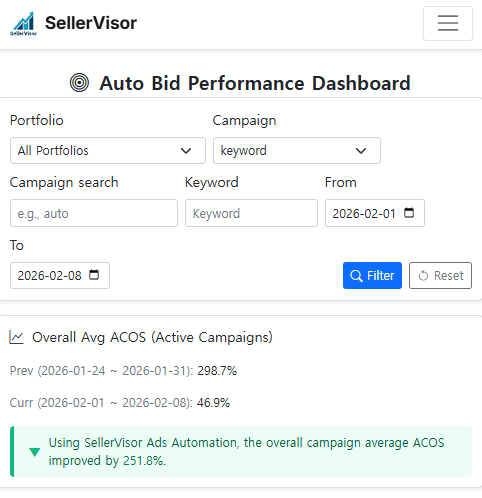
This is the figure confirmed on the SellerVisor Auto Bid Performance Dashboard.

  • Prev (2026-01-24 ~ 2026-01-31): average ACOS 298.7%
  • Curr (2026-02-01 ~ 2026-02-08): average ACOS 46.9%
  • The dashboard display baseline improvement 251.8%
The important thing here isn’t the “percentage figure,” but the fact that it decreased from 298.7% to 46.9%.
An ACOS of 298% means ad costs are dominating sales; 46.9% indicates it has entered at least a “controllable efficiency zone.” (Of course, target ACOS varies depending on category/margin/product circumstances.)
※ Note: The above results are based on specific periods/accounts, and cannot be guaranteed to be reproducible across all accounts. However, the goal of this update is not to produce a “big hit,” but to structurally prevent excessive spending risks.


The new features prevent RPC Amazon ad automation from excessively overspending.

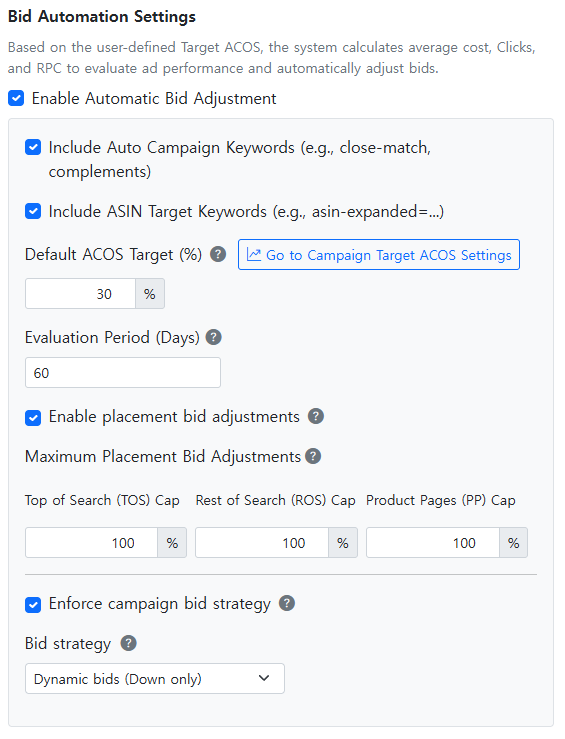
1) Placement bid adjustments ON/OFF

  • You can now choose to apply/disapply placement adjustments themselves.
  • If you’re worried about automation due to placement, start with OFF.

2) Maximum Bid Placement % (upper limit)

  • Set the ‘maximum increase percentage’ separately for Top of Search / Rest of Search / Product Pages.
  • For example: TOS 50%, ROS 10%, PP 30%
    → Volumes will not exceed these, structurally blocking bid runaway.

3) Placement strategy selection (Down only / Up & down / Fixed)

  • Three strategies provided by Amazon are now selectable in SellerVisor.
  • This allows you to explicitly set the automation’s risk profile as “conservative/aggressive.”


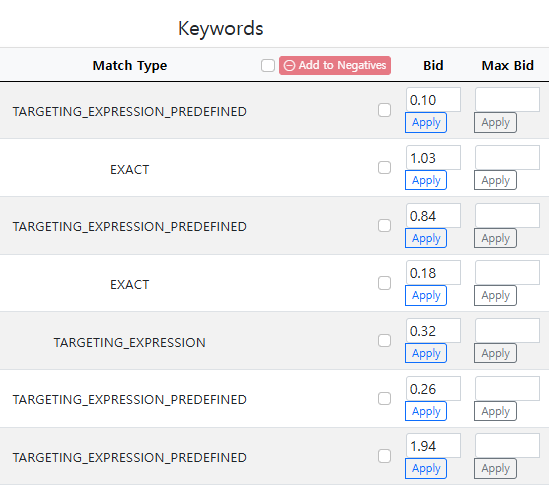
Many miss this safety mechanism: Max Bid per Keyword


This previously existing feature was often overlooked by many.
  • Ads Management(Beta) > Campaign & Keyword Bid Optimization
  • Set a Max Bid per Keyword (or Target), which won’t go beyond that value regardless of circumstances.
This feature is powerful when used together with Placement upper limits.
  • Placement upper limit = “multiplier limit”
  • Keyword Max Bid = “absolute limit”
Using both makes things much safer than expected.


UI update for at-a-glance monitoring of automation performance


This time, not only showing results but also enabling tracking of why changes occurred.
  • Ads Management(Beta) > Bid Automation Performance Dashboard
    • Check bid adjustments, clicks/purchases, revenue, ACOS, and conversion rate by date immediately.
  • Automation History
    • Review “why this bid was set” flow, based on RPC.
Automation should not be trusted blindly but used as a tool monitored by data. This UI update makes it easier to verify such insights.


The safest way to restart automation immediately


Navigate to the following in SellerVisor.
  • Login → Gear icon (Settings) → Settings(Ads) > Bid Automation Settings
  • Check Enable Automatic Bid Adjustment to start
Then follow these recommended steps:

Recommended Setup A: Safest starting point (conservative)

  1. Placement bid adjustments: OFF
  2. Set Max Bid per keyword: mandatory
  3. Check data for 3-7 days, then consider gradually turning placement ON once stable

Recommended Setup B: Balanced approach (most start from here)

  1. Placement bid adjustments: ON
  2. Placement strategy: Down only
  3. Start with conservative Maximum Bid Placement %
    • e.g., TOS 50~150% / ROS 0~50% / PP 0~50% (adjust based on account)
  4. Apply Max Bid per keyword as well
One key principle:
Start safely, avoiding aggressive settings initially; expand based on data.


SellerVisor Ads Automation (RPC) is a powerful way to improve efficiency.
However, as automation becomes stronger, what sellers need isn’t “more leverage” but stronger brakes.
This update added those brakes (safety mechanisms), and a case where average ACOS dropped from 298.7% to 46.9% has been confirmed.
Now, automation that was “scary to turn on” can be restarted as controlled automation you can manage.

Try it out now.
Thank you!
← 返回